
Related Products

NexiGo N930E Pro, 4K Webcam with...

HP 15.6″ Laptop with Microsoft...

NIMO 17.3″ IPS FHD-Student-Laptop,...

XPPen Upgraded Artist13.3 Pro V2...




Product description


1 240 Hz Display
2 Ultra-Smooth Motion
3 Work and Play
4 Faster Visual Feedback


1 Customizable Focus Timer
2 Your Desk Companion
3 Personalize Your Display
4 Web and App Control
5 Compact Space-Saver


1 10-in-1 Connectivity
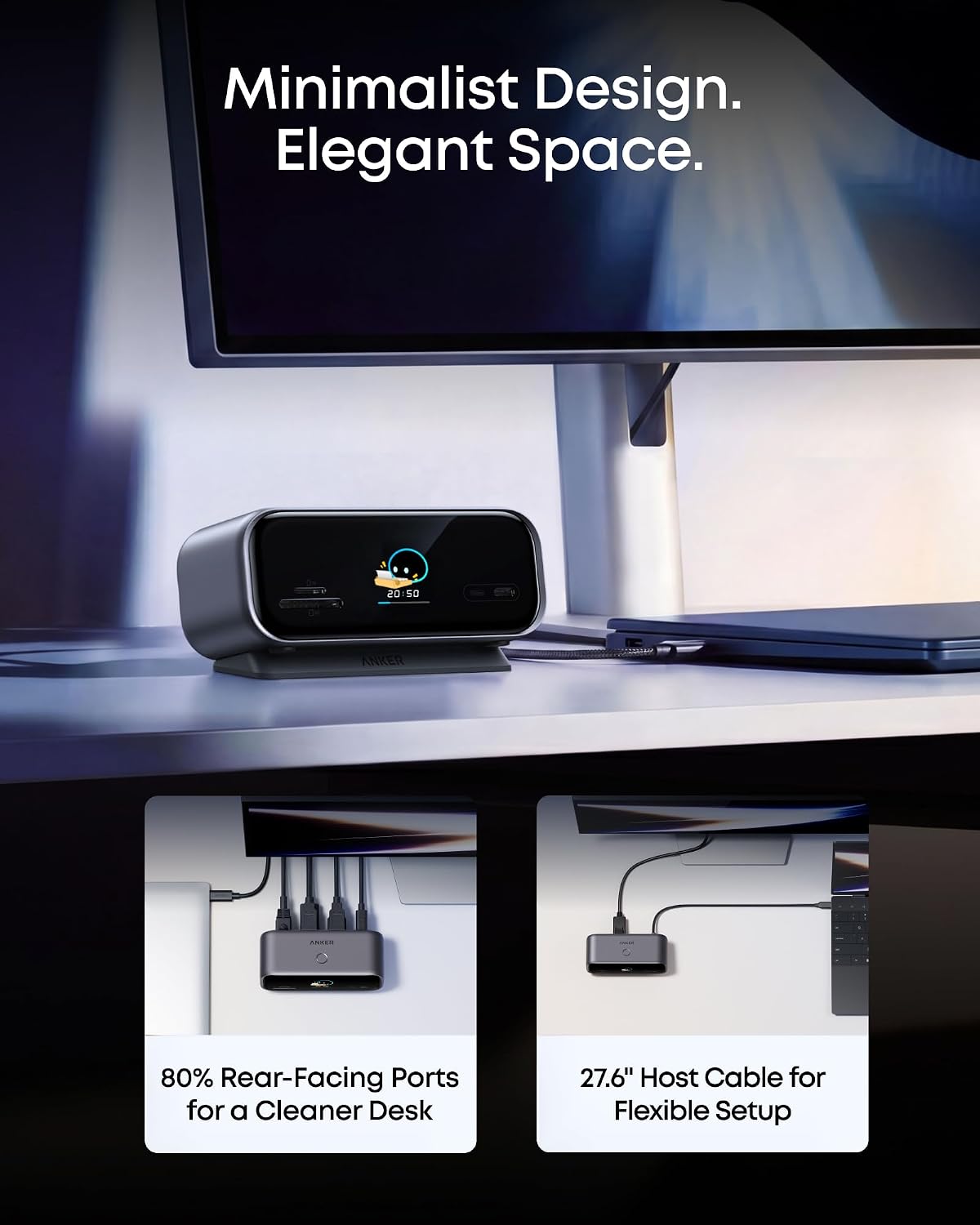
2 Declutter Your Desk
3 80W Host Charging
4 10Gbps Data Transfer
5 Magnetic Base


1 Button Control Guide
2 Universal Compatibility
3 Resolution Support
4 Display Modes
5 Important Product Notes
Model Number: A210C [Anker Desktop USB-C Hub]
High-Bandwidth Chip Architecture: Powered by an advanced display controller, the hub efficiently manages video and data bandwidth across all ports. It is designed to support up to dual 2K@240 Hz displays alongside high-speed data transfer. (Note: Dual 2K@240 Hz output requires a host laptop USB-C port that supports for DP 2.1 with DSC 3:1).
Minimal Footprint to Free Up Space: Measuring 5.12 × 1.97 × 2.19 in, the compact upright design takes up minimal desk space. Rear-facing ports route cables out of sight, keeping your setup clean and uncluttered.
A Screen You Can Personalize: Beyond port status, the display doubles as a desktop photo frame and focus companion, timing your work sessions and reminding you to take gentle breaks throughout the day.
Snap On for a Better Angle: The included magnetic base snaps on to lift the display to a comfortable viewing angle, while the residue-free adhesive keeps the hub stable on your desk. The base is washable and reusable. (Note: Adhesion performance may vary depending on the surface.)
Compatibility: Works with laptops whose USB-C ports support Power Delivery, DisplayPort 1.2 / 1.4 / 2.1, and either USB4 or Thunderbolt 3 / 4 / 5. Supports Windows 10 / 11 and macOS. (Note: On macOS, both external monitors will display identical content. This device is not compatible with Linux.)
Notes:
1. Extended display mode differs by system. On Windows, each external monitor can show different content. On macOS, both external monitors show the same content.
2. Dual 2K@240 Hz output requires a host laptop USB-C port that supports DP 2.1 with DSC 3:1. Video output is supported through HDMI and DisplayPort only. USB-C monitors are not supported.
3. Charger not included. For best performance, use a 65W or higher USB-C charger. Without an external charger, the hub draws power from your laptop for basic functionality.
4. The USB-A ports and the front USB-C port support data transfer only. They do not support charging or video output.
All-in-One Connectivity: The 10-in-1 design features one HDMI 2.1 port, one DisplayPort 1.4 port, one 100W max PD-IN port for up to 80W host charging, one 10 Gbps USB-C port, one 10 Gbps USB-A data port, two 5 Gbps USB-A ports, one Gigabit Ethernet port, and SD/microSD 3.0 card slots. (Note: Charger not included. For optimal performance, use a 65W or higher USB-C charger.)
Dual Display Support with Up to 2K@240 Hz: Drive a single monitor at up to 4K@144 Hz or 2K@240 Hz, or expand to dual 2K@240 Hz displays for ultra-smooth motion in gaming, editing, and streaming. (Note: Dual 2K@240 Hz output requires a host laptop USB-C port that supports DP 2.1 with DSC 3:1. Video output is supported through HDMI and DisplayPort only.)
Smart Built-In Display: The built-in display shows real-time port status, charging power, data transfer speed, and device temperature. Upload your own images for a rotating slideshow, or press twice to start the customizable focus timer.
Declutter Your Desk Setup: With 80% of ports facing the rear, cables route backward and downward to reduce the clutter common with flat hub designs. A 27.6-inch built-in host cable allows flexible placement while keeping the front of your desk clear.
Web and App Control: Customize your smart display, track port status, and adjust the 25-minute focus timer settings on the web dashboard, or run photo album slideshows and firmware updates through the app.
Compatibility: Works with laptops whose USB-C ports support Power Delivery, DisplayPort 1.2/1.4/2.1, and either USB4 or Thunderbolt 3/4/5. Supports Windows 10/11 and macOS. (Note: On macOS, both external monitors will display identical content. This device is not compatible with Linux.)
What’s in the Box: Anker Desktop USB-C Hub, magnetic base, safety sheet with QR code for the user manual, hassle-free warranty, and our friendly customer service.