
Related Products

HP Series 3 27 inch FHD Monitor,...
HUION KAMVAS Pro 16 Drawing Tablet...


NexiGo N930E Pro, 4K Webcam with...



Product description


Phone/Tablet Connection Steps (Bluetooth Mode):
Long press the finger ring mouse wheel for 1 second to turn on the phone.Press and hold the left and right buttons for 1 second to switch to Bluetooth mode. (Indicator light blue blinking).Turn on your cell phone’s Bluetooth function, search and connect to “D06 Pro”.Turn on “Assistive Touch”, the assistive touch dot will appear on the page. Successfully connect to use.
Laptop/Desktop Computer Connection Steps (2.4GHz Mode):
Long press the finger ring mouse wheel for 1 second to turn on the computer.Press and hold the left and right buttons for 1 second to switch to 2.4G mode. (Indicator light red and blue light flashes alternately, when it goes off, it means the connection is successful).Insert the USB receiver into the USB port of the device.When the indicator light goes out, it means the connection is successful
Laptop Connection Steps (Bluetooth Mode):
Long press the finger ring mouse wheel for 1 second to turn on the computer.Press and hold the left and right buttons for 1 second to switch to Bluetooth mode. (Indicator light blue blinking).Open the Bluetooth on the device, search for “D06 Pro” and connect. Connect successfully to use.
Ring Mouse:
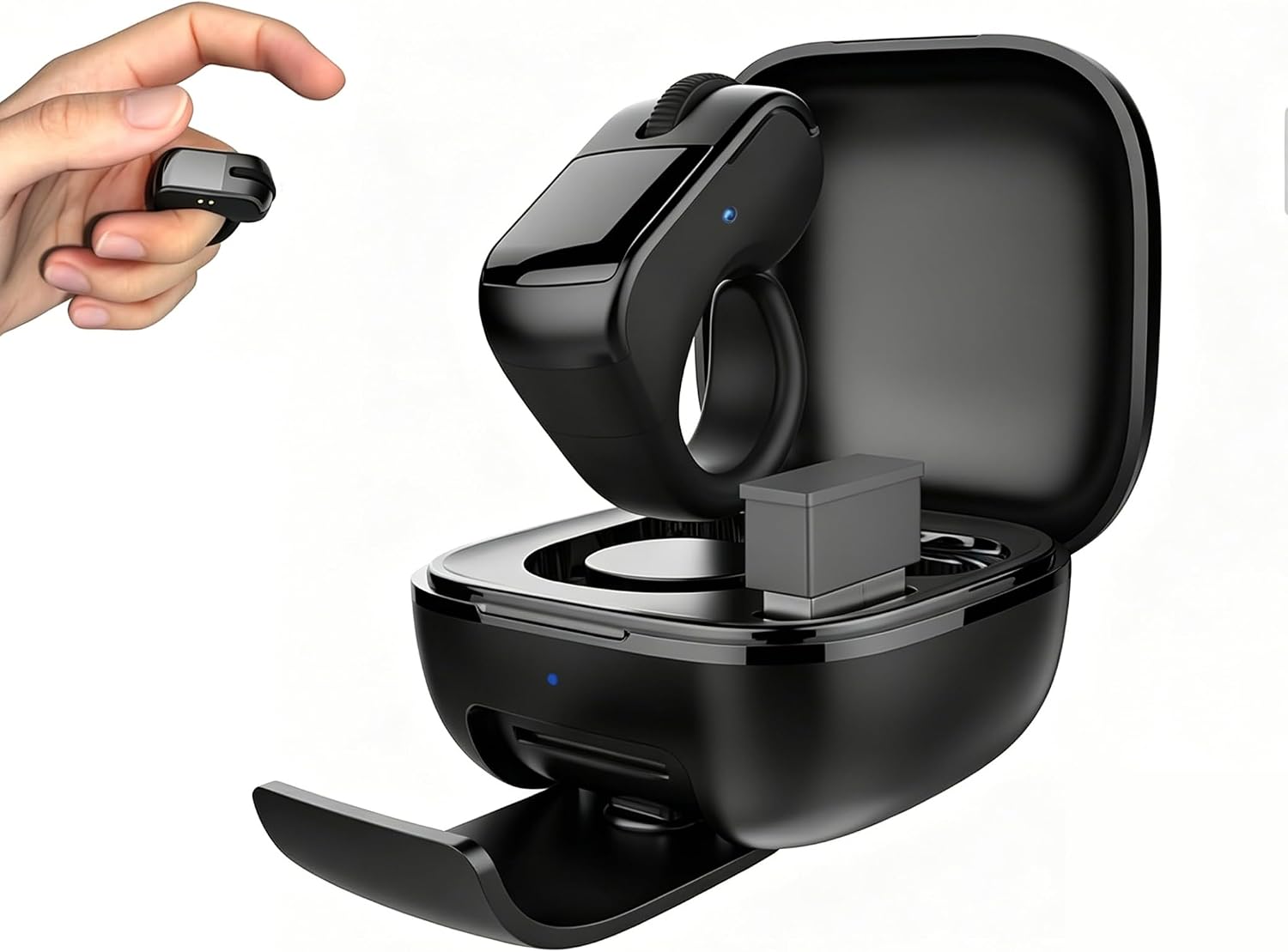
Charging: Blue light of charging case always on.Fully charged: Blue light of charging case off
Charging Case:
Charging: Red light of charging case blinks slowly.Fully charged: Red light of charging case is always on
Low Battery Warning:
When the indicator light of the Ring Mouse blinks red and the blue light of the charging case blinks blue, it is a reminder that the battery is low and needs to be recharged.
How to Shutdown:
Long press the scroll wheel for 5 seconds, the red light blinks 2 times, or put it into the charging case;Not connected for 5 minutes without operation automatically shut down.If you have been connected for 30 minutes, it will turn off automatically.
[Finger Ring Mouse Wireless] – Works flawlessly with both Bluetooth and 2.4GHz USB, giving you stable, responsive control from up to 33 feet away. Switch easily between your laptop, tablet, and phone with a single button press. No re-pairing, no hassle, just plug and play convenience. Perfect for anyone who moves between multiple devices throughout the day
[Remote Control Ring for Phone] – Scroll TikTok, flip Kindle App pages, advance PowerPoint slides, and snap remote selfies without touching your screen. The responsive scroll wheel, left/right buttons, and smooth touchpad put full control at your fingertip. Great for lazy scrolling in bed, presenting in meetings, or filming content hands-free. (For precise cursor work, adjust pointer speed in your device settings. Best for scrolling, page-turning, and media control — not designed as a full desktop mouse replacement.)
[Ring Mouse for Reading] – Read without touching — Kindle App ready (not for Kindle e-readers). Flip pages on your iPad, iPhone, or Android tablet while keeping your hands warm under the blanket. Perfect for bedtime readers, students, and anyone who loves to read without holding a device. (Works with Kindle App on phones/tablets. Not compatible with Kindle Paperwhite/Oasis hardware.)
[Remote Shutter Ring] – Capture every moment with remote shutter control. Long press the left or right button for 1 second to take photos or start/stop video recording. Ideal for group selfies, vlogging, content creation, and hands-free filming from a distance. (For the best camera experience, use with a phone stand or tripod.)
[Presentation Remote Ring] – Present freely — control PowerPoint, Google Slides, and Keynote from anywhere in the room. The scroll wheel advances slides, and the touchpad moves your cursor for on-screen annotations. A must-have for teachers, business professionals, and public speakers. (For iOS users: enable Assistive Touch in Settings → Accessibility → Touch.)
[Ergonomic Ring Mouse] – Lightweight and comfortable, this ring mouse fits securely on your finger and reduces wrist strain and hand fatigue during long scrolling or reading sessions. The flexible ring adjusts to any finger size, and you can wear it while typing, drawing, or even driving — zero interference. A great choice for anyone with tired hands, carpal tunnel, or arthritis. (Designed with flexible, durable silicone that fits most finger sizes. For best longevity, avoid over-stretching when putting on or taking off.)
[Wireless Mouse for All Devices] – Works flawlessly with Windows, Mac, iPad, Android, and Linux. Just pair via Bluetooth — no drivers, no complicated setup. Connects instantly to your laptop, desktop, tablet, or smartphone. Highly recommended for students, teachers, office workers, and frequent travelers
[Long Battery Life Ring Mouse] – Up to 82 hours of use with the compact charging case, so you’re always powered and ready. The case recharges via Type‑C and doubles as a phone stand — ideal for watching videos, reading, or video calls on the go. (For best battery life, fully charge both the ring and the case before first use. If the ring doesn’t charge, clean the metal contacts on both the ring and the case with a dry cloth.)
[Portable Mini Mouse] – Weighing just 1.22oz and small enough to slip into any pocket or bag, this is the ultimate travel companion for home, office, coffee shops, airports, or road trips. Easy to carry, easy to store, and easy to love — a tiny gadget that makes a big difference wherever you go
[All‑Day Anywhere Ring Mouse] – From treadmill workouts and classroom lectures to sofa browsing and kitchen recipes, this ring fits every moment of your day. Use it on the treadmill without breaking stride, scroll recipes with clean hands, change videos from the passenger seat, or flip pages in bed. Works great in the gym, in the car, in bed, on the couch, or even in the bath. (If the ring doesn’t connect, try turning it off and on, or re-pairing via Bluetooth. If the scroll wheel becomes unresponsive, clean the wheel edge with a dry cloth.)
$35.99