
Related Products

Sanyun SW208 3″ Active Bluetooth...

OHAYO 40W Wireless Portable Bluetooth...


Sound Bar, 100W Sound Bar for Smart...


Product description

INSTRUCTIONS & INFO

Fix volume, channel changing, and other remote issues
The Genie remote uses light to send the signal to the receiver. If anything is blocking the receiver, this can affect the functionality of the remote. We recommend having the receiver placed in an area that is free and clear of obstructions.

To test battery strength, press and hold any button on your remote.
If you see:
A solid green light – the batteries are strong.A fast blinking green light – the batteries are okay but may need to be replaced soon.A slow, blinking green light or no light – your remote needs new batteries. Remove the battery cover and insert two new AA batteries.

Check that the remote is set to control your DIRECTV receiver.
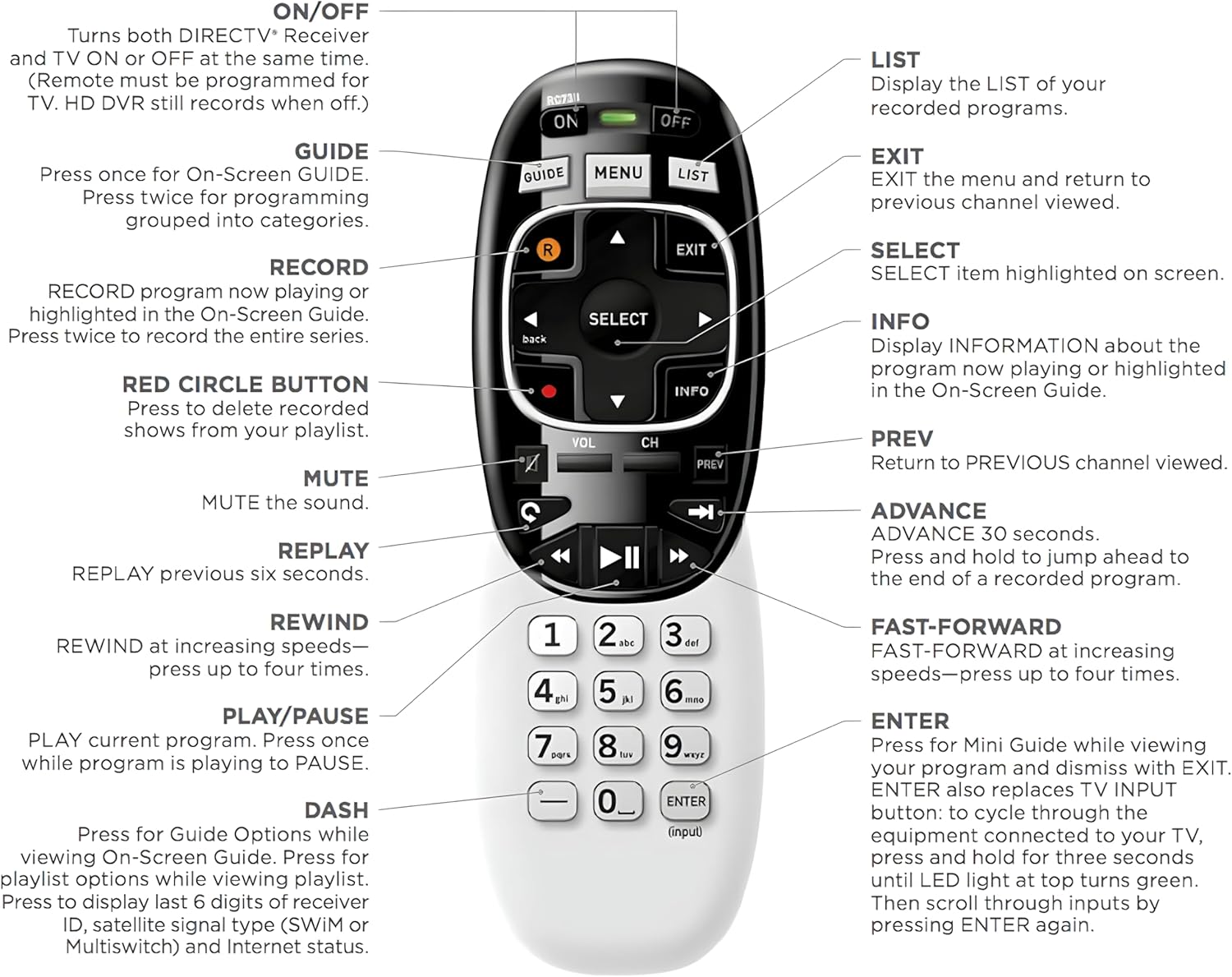
Press and hold the ENTER button for three seconds.A Source menu appears to change your TV’s input.Select the DIRECTV receiver’s input source. For example, HDMI 1: Satellite Receiver, may be the name of the input. Try different inputs to find the one set up for your TV.

Pair remote with your receiver
Is nothing happening when you press GUIDE? Make sure your remote is paired with your receiver.
Point the remote at your Genie, Genie Mini, or Wireless Genie Mini.Press and hold MUTE and ENTER at the same time on your remote.The screen displays Applying IR/RF Setup. The remote is synced.
Key Features
Model RC73 Range Controls effectively from various angles and distances up to 10 meters (33 feet). Compatibility Compatible with DirecTV HR20/HR21/HR34/HR44/HR54 DVR satellite dish receivers Swift & Reliable Control Responds in <0.2s, anti-dust soft-touch buttons, 150,000+ clicks endurance.

Receiver and Remote Control Reset
If the buttons on your remote are not responding, try resetting the receiver and remote control. Reset a receiver
On most DIRECTV receivers, there is a red button on the side of the receiver or inside the access card door.Press and hold the red button until the receiver restarts.
Note: Are you unable to locate the red button? Unplug the receiver’s power cord from the electrical outlet. Wait 15 seconds before plugging it back in. Reset a remote control If restarting your receiver didn’t help, try resetting the remote control:
Press MENU on the remote.Arrow down to Settings and press SELECT.Go to Remote Control and press SELECT.Select Pair/Program Remote. Depending on your setup, this may be automatic, or you may have to enter codes into your remote. Use the code lookup tool to find the 5-digit code.
If that didn’t help, try resetting the remote to its default factory settings:
Press and hold MUTE and SELECT together until the light flashes three times.Press 9, 8, 1 and SELECT. The remote flashes four times and should now reset.
Perfect for Genie Receiver

Elevate your entertainment experience with the DirecTV RC73 Universal Wireless Genie Remote, meticulously designed for flawless compatibility with DirecTV HR20, HR21, HR34, HR44, and HR54 DVR satellite dish receivers. Effortless integration is at your fingertips as you navigate channels, adjust volume, and tackle other remote tasks with precision.
Seamless Compatibility: Works perfectly as a replacement for the DirecTV RC73 remote, compatible with HR20, HR21, HR34, HR44, HR54 DVR satellite receivers.
Reliable Wireless Control: Enjoy smooth control with IR/RF functionality, so you don’t need to point directly at the receiver. Great for wall-mounted TVs or hard-to-reach setups.
Fast, Responsive Buttons: Every button press registers instantly — under 0.2 seconds. With soft-touch anti-dust keys rated for 150,000+ clicks, this DirecTV remote is built for long-term daily use.
Built to Last: Durable construction resists wear and tear from everyday use. Whether you’re replacing an old DirecTV remote control or just need a backup, this one is made to last.
Simple Setup: No tech skills required. This AT&T DirecTV remote control replacement is easy to sync and works right out of the box with supported receivers.
$34.99