
Related Products

MCY USB C Hub,Laptop Docking Station...

MOFII Wireless Keyboard and Mouse...




Product description


1 Tri-Mode Connection
2 2.4G Mode Connection
3 Bluetooth Mode Connection


1 PAW3311 Sensor
2 Up to 12000 DPI
3 LED Screen Design
4 No Bright Red Light
5 500mAh Rechargeable Mouse


Better Understanding of the Xiaobi Mouse
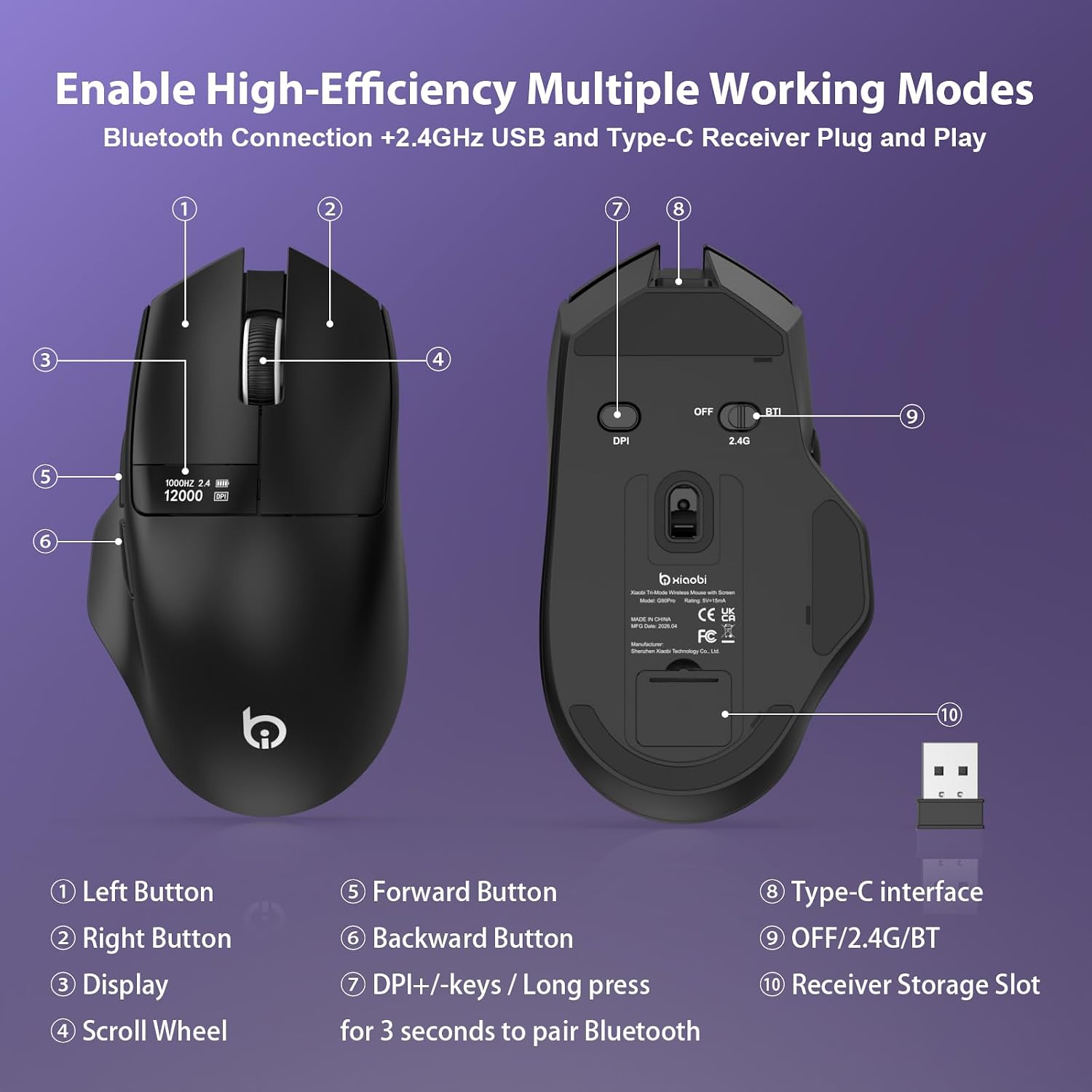
Q1 Why is my wireless mouse not working? A1 1. Make sure the power switch is set to “ON”. 2. Try to plug the receiver into a different USB-A port or Restart the computer. 3. The battery might be dead. Q2 Can this mouse be connected via Bluetooth? A2 Yes. Switch the button to BT1, the indicator flashes slowly. Press and hold the DPI buttor for 3 seconds to enter pairing mode (BT indicator flashes rapidly), that you can connect with “G9 Pro Mouse” via Bluetooth. Q3 Why does the office mouse feel uncomfortable? A3 1. Switching from a traditional to an ergonomic mouse may require 1-2 weeks of adjustment. 2. Please adjust your grip to allow your palm to naturally fit the curve of the mouse to reduce hand fatigue. Q4 Is this mouse suitable for all hand sizes? A4 This mouse prefer medium to large sized hands users. This mouse is L 5 inches, W 2.83 inches, H 1.65 inches, and a weight of 2.18oz. Q5 Why doesn’t the bottom of the mouse light up in red? A5 This mouse is equipped with a PAW3311 sensor and features a non illuminating invisible design, so the red light effect cannot be seen. Compared to traditional mice, this has significantly improved battery life, better desktop compatibility, and is night friendly to use. Q6 How can I confirm the DPI of the mouse? A6 Press the DPI button on the mouse, and then you can switch to view the DPI value you need on the mouse screen. Easily switch between 800-1600-2400-3200-6400-12000. Q7 Why isn’t the mouse screen lit up? A7 The low battery level is causing the screen to not light up. Please charge it in a timely manner. Q8 How to adjust the return rate of this mouse? A8 When in 2.4G mode, holding down the scroll wheel and right button for 5 seconds can switch the return rate supporting 125Hz/250Hz/500Hz/1000Hz. Note: Bluetooth mode uses a fixed 125Hz polling rate, while wired mode supports up to 1000Hz
【Tri-Mode Connectivity】This bluetooth mouse is designed for ultimate compatibility. Easily switch between 2.4G wireless, Bluetooth, and wired modes, allowing seamless connection to multiple devices such as laptops, desktops, and tablets. Plug and play, no program driver required. 📌📌Bluetooth Mode: Switch the button to BT1, the indicator flashesslowly. Press and hold the DPI button for 3 seconds to enter pairing mode (BT indicator flashes rapidly). Select the device in your Bluetooth list to connect.
【Precision Tracking with PAW3311 Sensor】Powered by the PAW3311 optical sensor, this wireless mouse for laptop delivers smooth and accurate tracking with up to 12,000 DPI and 6 adjustable levels (800/1600/2400/3200/6400/12000)—perfect for everyday work, precise control, and can also be used as a gaming mouse for casual gaming. 📌📌NOTE: When in 2.4G mode, holding down the scroll wheel and right button for 5 seconds can switch the return rate, supporting 125Hz/250Hz/500Hz/1000Hz.
【Smart LED Display for Instant Status】 This computer mouse features a built-in LED screen that lets you easily check connection mode, DPI, and polling rate, so you can adjust settings on the fly. The OLED display also shows battery level at a glance, helping you avoid unexpected downtime.📌📌 NOTE: When the display screen of the office mouse goes black, the battery is low and needs to be recharged.
【Convenient Rechargeable】With a 500mAh rechargeable battery, this office mouse delivers exceptional endurance. Its USB Type-C port enables convenient use-while-charging, ensuring uninterrupted operation. 📌 📌 NOTE: Up to 36 hours of continuous use in 2.4G mode and 40 hours in Bluetooth mode.
【Lightweight & Comfortable for Daily Use】Ergonomic and lightweight design ensures long-lasting comfort, making it ideal for extended office work, study, or everyday use. 📌For comfort, require 1-2 weeks of adjustment.
NOTE: The USB A receiver stores inside the mosue. 📌📌If the mouse isn’t suitable, place the USB receiver in the battery compartment and return both.
Original price was: $29.99.$21.99Current price is: $21.99.