
Related Products

TP-Link AX3000 WiFi 6 Range Extender...

TP-Link Tri-Band BE9300 WiFi 7...


TP-Link Deco X15 Dual-Band AX1500...


Product description

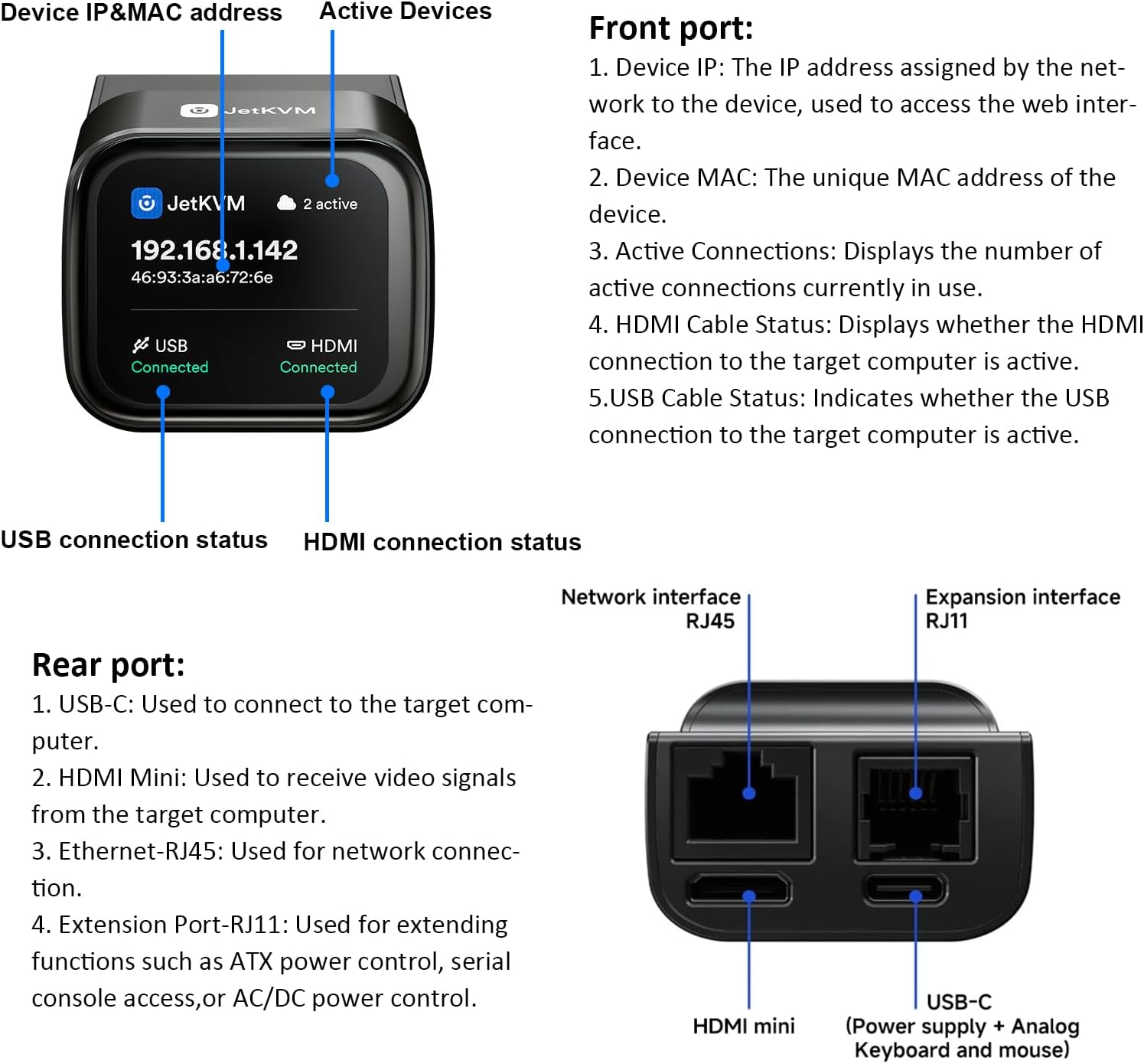
JetKVM is a high-performance, open-source KVM over IP (Keyboard, Video, Mouse) solution designed for efficient remote management of computers, servers, and workstations. Whether you’re dealing with boot failures, installing a new operating system, adjusting BIOS settings, or simply taking control of a machine from afar, JetKVM provides the tools to get it done effectively.
Key Features
Ultra-low Latency – 1080p@60FPS video with 30-60ms latency using H.264 encoding. Smooth mouse and keyboard interaction for responsive remote control.Free & Optional Remote Access – Remote management via JetKVM Cloud using WebRTC.Open-source software – Written in Golang on Linux. Easily customizable through SSH access to the JetKVM device.
Three ways for the Networking

Local Access
Default mode for LAN access via the device’s IP (shown on screen). Optional password protection keeps authentication local; tokens stored as HTTP-only cookies for 7 days.

Remote Access-Lifetime free
Global access via cloud dashboard, enabled with OIDC (Google) authentication. Uses WebRTC with DTLS/SRTP encryption; free STUN/TURN servers handle strict NAT/firewalls under a Zero Trust model.

Wake on LAN
Send “magic packets” from the web UI (local or remote) to wake LAN computers; target devices must be configured to accept magic packets.
5V(Only) via the controlled PC’s USB-A or USB-C

What’s in the Box
1. HDMI Mini Cable
High-quality cable for video connection
2. USB-C to USB-A Cable
For data and power connectivity
3. Y-cable USB-C Power/Data Splitter
Enables simultaneous power and data transmission
4. User Manual
Power only with 5V via the controlled computer’s USB-A/USB-C port.
For safety & reliability, power JetKVM through the computer’s built-in USB port, official ATX power extension, or official DC power extension only.
Y-cable compatibility note: Most PD chargers are unsupported. Without PD negotiation lines, some chargers cannot stably output 5V for JetKVM. Voltage exceeding 5V may damage the device.
USB-C to USB-A Cable power supply is recommended.
Add to Cart
Add to Cart
Add to Cart
Add to Cart
Customer Reviews
4.6 out of 5 stars 47
—
—
4.8 out of 5 stars 6
Usage
Device ATX Power Extension Board DC Power Control Extension Device
Usage Case
PC PC Mini PC&NAS PC
1. What is KVM over Internet, and how is it different from a traditional KVM switch?
A traditional KVM switch lets you control multiple computers locally with one keyboard, monitor, and mouse.
KVM over Internet allows for actions like BlOS access and Operation System reinstallation, as if you were directly at the device.
2. How does JetKVM differ from regular remote desktop software?
JetKVM, a remote KVM offers hardware-level control, works even if the computer crashes or lacks an operating system. While remote desktop
software unusable during system failures or a power-off device.
3. Do I need coding skills to use JetKVM?
No. Setup is fast and simple-just connect the cables and bind to JetKVM Cloud. You can control your devices right away.
4. Is JetKVM suitable for personal home use?
Yes. It’s ideal for remote office workers, remote employees, and casual home users.
5. What kind of network connection does JetKVM require?
JetKVM works with standard wired. A stable broadband connection is recommended for smooth remote control, with no special network configuration needed.
6. Is JetKVM compatible with different operating systems?
Yes. Since it operates at the hardware level, JetKVM is compatible with all mainstream operating systems (Windows, macOS, Linux, etc.) and even works with devices that have no OS installed.
7. Does it come with Tailscale?
Tailscale is not pre-installed on the device. However, tailscale has added out of the box support for JetKVM, which means that you can easily install Tailscale on the device.
Instant BIOS-Level Control: Experience ultra-low latency (30-60ms) and 1080p/60fps streaming with JetKVM. Access BIOS, install operating systems, and manage headless servers remotely as if you were there. No more waiting for OS-based software to load; get full hardware-level control instantly.
Plug-and-Play IP KVM: Zero software, drivers, or subscription fees required. This ip kvm works via any web browser (Chrome/Firefox). Simply connect via HDMI and USB to control your PC, Mac, or Linux system. The built-in LCD touchscreen displays the IP address for effortless setup.
Secure & Open Source: Built on a robust Linux and Golang foundation, jet kvm offers transparency and privacy. Connect via your local network kvm or use the optional WebRTC cloud for secure access behind restrictive NAT environments. Perfect for home labs and professional data centers.
Universal Remote Management: This jetkvm kvm over ip is fully OS-independent and supports everything from Windows to Raspberry Pi. Use it as a remote kvm to manage devices globally. Powered by USB, it features a minimal, bloat-free system designed for maximum stability and uptime.
【ATX Power Control】 manages PC power states (USB-C/5V power, PCIe bracket for clean cable routing, dual pin headers). 【DC Power Control】 supports 12-20V DC devices (mini PCs/NAS) with 5.5×2.5/2.1mm adapters. Extension Power Control sold separately. See our store for details.
$103.99