
Related Products

MIATONE Boombox Portable Bluetooth...


HDMI Media Player, Black Mini 1080p...




Product description

Purpose-Built for Professional Digital Signage
Fully Integrated with the OptiSigns Platform
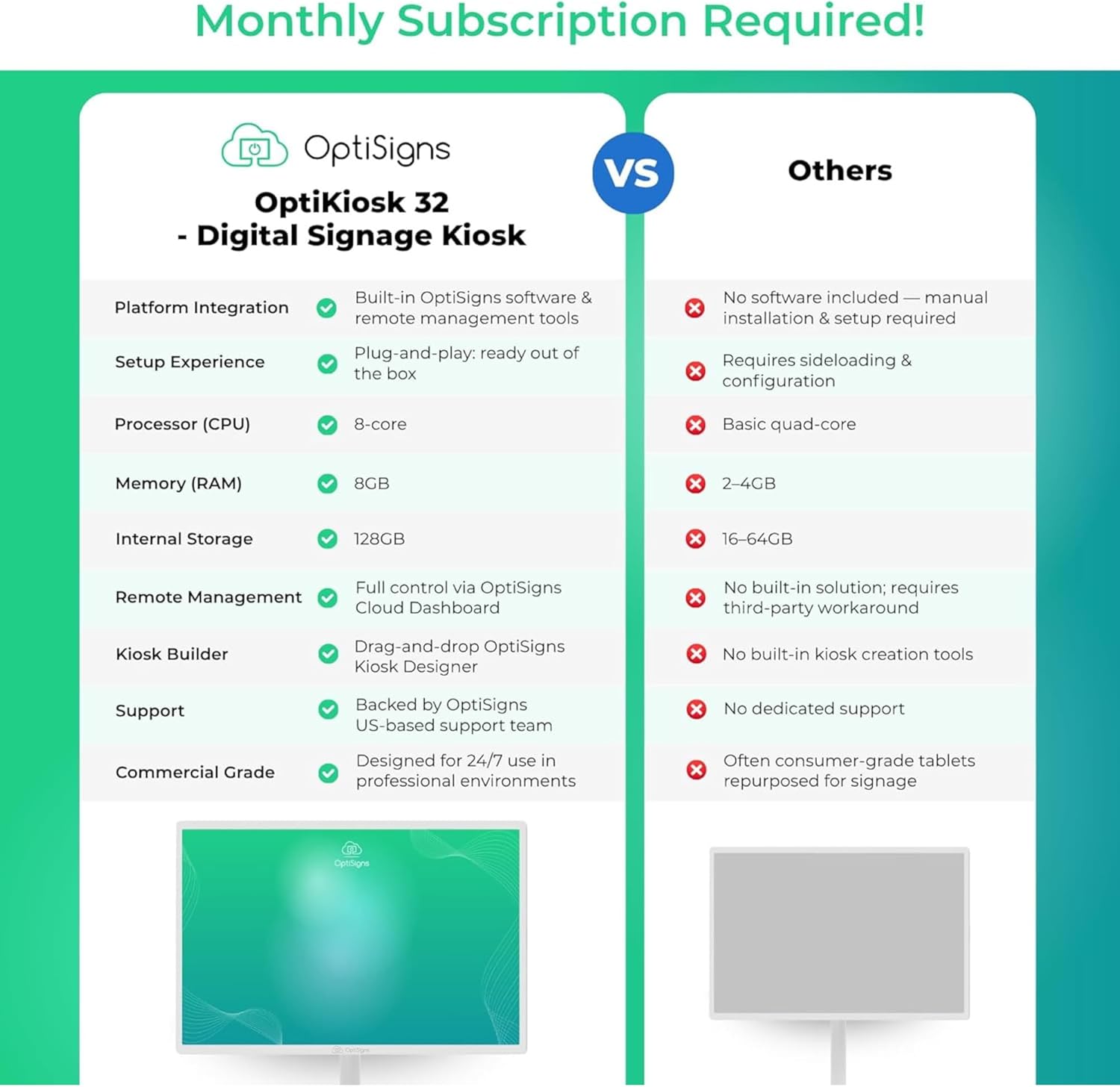
The OptiKiosk 32 comes pre-installed with OptiSigns software, giving you immediate access to 160+ popular app integrations, 5,000+ templates, and a powerful drag-and-drop Kiosk Designer. It’s ready to go out of the box and built to manage content remotely from anywhere.
Commercial-Grade Hardware for Demanding Environments
Designed for reliability, the OptiKiosk 32 features an octa-core processor, 8GB RAM, 128GB storage, full HD touchscreen, and optional rechargeable battery. Whether wall-mounted or on a stand, it’s built to perform in offices, retail spaces, lobbies, and events.
Secure and Locked-Down for Kiosk Use
With lockdown mode enabled, users can’t exit the OptiSigns app or access other parts of the system. This keeps your content secure and ensures the kiosk is used exactly as intended — as a focused, interactive signage device.
What Can It Do?

Manage Your Screens Remotely
Effortlessly manage and update your kiosks remotely from anywhere globally through our intuitive web portal or user-friendly mobile app.

Optimal Network Connectivity
Equipped with reliable wireless connectivity, this device offers flexible and stable network integration for managing and updating your content remotely.

Easy Content Management
Built for simplicity, OptiSigns is perfect for users of all skill levels. Edit and display high-resolution content effortlessly with our intuitive drag-and-drop interface, a wide selection templates, and support for numerous file types.

Simple Deployment
Featuring OptiSigns pre-installed, the OptiKiosk 32 is ready to use right out of the box. With an all-in-one display and touchscreen built in, there’s no need for external screens or complex wiring. Simply power it on, connect to WiFi, and pair it with your OptiSigns account to start delivering content exactly where and when you need it.
Optimize Your Screens With Our Useful Features

App Integration
Enhance your displays with over 160+ app integrations, including real-time social media feeds, weather updates, and videos from YouTube. Use the Designer tool to create visually appealing content and integrate seamlessly with Microsoft and Google workspace apps like PowerBI. Our split screen app allows you to segment the screen into zones, displaying multiple pieces of information simultaneously.

Automated Data Mapping
Dynamically map your API data to digital displays for automatic, real-time content updates without manual adjustments. Perfect for displaying team profiles, building directories, sales leader wall, celebrating special birthdays, or even putting your products front and center. Our data mapping makes dynamic content display a breeze!

Advanced Playback Control
Enhance your digital signage with advanced playlist management features that offer precision and flexibility. Users can control content playback with high precision, setting specific intervals, resuming from the last stop point, and managing sub-playlists and split screen content. These capabilities ensure seamless content delivery and compliance with scheduling needs or advertising agreements.

Easy Content Creation
Transform your digital signage with OptiSigns’ Designer tool and a vast library of thousands of templates. Quickly craft stunning visual content using an intuitive interface that requires no prior design experience. Utilize premade templates, widgets, photos, QR Codes, animations, and Giphys to create engaging displays.
How Our Customers Are Using OptiKiosk 32


Price
$799.99$799.99 $229.99$229.99
Best For
High-visibility interactive displays, wayfinding, trade shows, and lobby environments Compact check-in, visitor registration, surveys, and countertop interactions
Screen Size
32″ Display 10″ Display
Resolution
1920 × 1080 (Full HD) 800 × 1280 (HD Portrait)
Installation & Form Factor
Wall-mounted or optional mobile stand configuration Countertop compact design
Power & Mobility
Plug-in (wall mount) or mobile stand with built-in battery (up to 8 hours) Plug-in operation
Performance & Memory
Octa-core processor, 8GB RAM, 128GB storage Quad-core processor, 4GB RAM, 32GB storage
Ideal Deployment Environment
Corporate lobbies, events, trade shows, large retail environments Reception desks, retail counters, clinics, small spaces
Frequently Asked Questions
1. What can I display on the OptiKiosk 32? The OptiKiosk 32 fully supports all OptiSigns apps and templates. You can show videos, playlists, live dashboards, websites, and interactive forms, and integrate content from over 160 apps.
2. Does the OptiKiosk 32 support touch interactivity? Yes. The 32-inch full HD touchscreen supports multi-touch interaction. To fully unlock kiosk-specific features like custom buttons and interactive navigation, an OptiSigns Engage Plan or higher is required. Without this plan, the kiosk can still be used for non-interactive signage or to display live content.
3. Can I mount the OptiKiosk 32 in portrait mode? Yes. The device supports both landscape and portrait orientations, giving you flexibility for different spaces and use cases.
4. Does the OptiKiosk 32 have a built-in battery? An optional built-in rechargeable battery is available. This allows you to use the kiosk in portable setups such as events, pop-ups, or mobile activations without needing constant access to a power outlet. The battery can last up to 8 hours on a full charge, depending on content type.
5. How do I set up the OptiKiosk 32? Setup is straightforward: power it on, connect to WiFi, and use the pairing code shown on screen to link the device to your OptiSigns account. From there, you can manage content, scheduling, and device settings remotely.
6. How secure is the OptiKiosk 32? The OptiKiosk 32 includes a lockdown mode that can be enabled through the OptiSigns portal. This helps prevent users from exiting the OptiSigns app or accessing other parts of the system while in use. The device runs Android 14 AOSP, which is fully compliant with Google’s Terms of Service. It does not require users to log into a Google account, making it a secure and privacy-conscious solution for public or unattended environments.
7. Why should I choose the OptiKiosk 32 over a tablet or other kiosk solutions? The OptiKiosk 32 is an all‑in‑one interactive signage kiosk built for commercial reliability, not consumer‑grade limitations. It supports both portrait and landscape orientation, includes device lockdown for kiosk security, and offers an optional rechargeable battery for portable use at events or activations. Pre‑installed with OptiSigns, it is purpose‑built to work with the OptiSigns platform and fully integrates with over 160 signage‑focused apps, 5,000+ templates, and our drag‑and‑drop kiosk builder, giving you a complete digital signage solution that goes far beyond a standard tablet or open Android device.
8. Can I install other apps or use the Google Play Store on this kiosk? No, the OptiKiosk 32 is not a general-purpose Android tablet and does not include access to the Google Play Store or other app stores. It is specifically designed to work with the OptiSigns platform and comes preloaded with OptiSigns software. All features and content must be managed through your OptiSigns account. While the platform supports over 160+ popular integrations (such as Google Slides, YouTube, Facebook, Canva, etc.), these are for digital signage purposes only, not general app usage.
9. Can I use this kiosk for apps like Netflix, Square, or other third-party services? The OptiKiosk 32 is designed to display content managed through the OptiSigns platform. It does not support direct installation of apps like Netflix, TikTok, Square, or other general-use applications. However, if the tool you need has a browser-based interface, it may be possible to access it using the Web App feature in OptiSigns. Keep in mind that this device is not intended for entertainment or app-based functionality. It is purpose-built for digital signage use only.
Ready Out of the Box: Comes pre-installed with the OptiSigns Player, allowing you to quickly set up and display live digital calendars, schedules, and content. Plug it in, connect to the internet, pair it with your OptiSigns account, and manage your kiosk remotely via the OptiSigns web portal or Mobile Admin App.
Built Specifically for OptiSigns: This is a purpose-built digital calendar, digital signage, and interactive kiosk advertising display designed to run the OptiSigns platform only. It does not support downloading apps from an app store or general Android use. Instead, it includes built-in signage integrations such as Google and Outlook Calendar, Google Slides, Power BI, YouTube, Canva, and more, all designed specifically for display and kiosk use.
Interactive and Flexible: Features a 32 inch full HD touchscreen with 10-point touch.
Create Engaging Content Easily: Choose from over 5000+ ready-made templates and use the OptiSigns Kiosk Designer to build custom interactive experiences with a simple drag-and-drop interface.
Built for Commercial Environments: Includes an octa-core processor, 8GB RAM, 128GB storage, WiFi 6, Bluetooth 5.3, HDMI input, and VESA mount compatibility.
OptiSigns subscription needed. Free plan supports up to 3 screens (each kiosk counts as one screen) with OptiSigns branding.
Remote Management Capabilities: Manage content, schedules, device health, and updates remotely via the OptiSigns web portal or mobile admin app from any location
Extensive Integration Support: Fully supports integrations with Power BI, Google Workspace, Microsoft Office, and access to over 160+ apps for enhanced functionality
$799.99