
Related Products


2000 ANSI 4K Decoding Projector...



BONSEN 16-Sheet Heavy Duty Paper...


Product description


PM64D Thermal Label Printer Easy to Setup
Step 1 Connect the printer to a power source.
Step 2 Press the power button to turn on the printer.
Step 3 Load the paper roll with the printable side facing up.
The video showcases the product in use.The video guides you through product setup.The video compares multiple products.The video shows the product being unpacked. phomemo thermal printer
PM64D Thermal Label Printer Printer Bluetooth Connection for Mobile(iOS/Android)
Step 1 Install the dedicated app following the instructions in the user guide.
Step 2 Turn on your phone’s Bluetooth, then pair with the PM64D printer inside the app.
Step 3 Load your file into the app and send it to print.
Important Note: The printer cannot connect directly to your phone.All pairing and connection must be completed within the app.Please make sure your phone’s Bluetooth is turned on before pairing in the app.
The video showcases the product in use.The video guides you through product setup.The video compares multiple products.The video shows the product being unpacked. phomemo thermal printer
PM64D Thermal Label Printer Printer Bluetooth Connection for Computer (Windows)
Step 1 Refer to the user guide to download and run the driver, then select your printer model – PM64D.
Step 2 Choose Bluetooth Connection to complete the driver installation.
Step 3 Start Bluetooth printing with ease!
The video showcases the product in use.The video guides you through product setup.The video compares multiple products.The video shows the product being unpacked. PM64D Thermal Label Printer
PM64D Thermal Label Printer Printer Bluetooth Connection for Computer (Mac)
Step 1 Refer to the user guide to download and run the driver, then select your printer model – PM64D.
Step 2 Choose Bluetooth Connection to complete the driver installation.
Step 3 Start Bluetooth printing with ease!
The video showcases the product in use.The video guides you through product setup.The video compares multiple products.The video shows the product being unpacked. Printer Bluetooth Connection for Computer (Mac)
PM64D with 500 Labels
Phomemo Thermal Printer
With Screen
Built-in paper tray
AirPrint
Bluetooth Connection
USB Connection
Ethernet Connection
203DPI
Print Clarity
203DPI
With Screen
Built-in paper tray
AirPrint
Bluetooth Connection
USB Connection
Ethernet Connection
203DPI
Print Clarity
300DPI
With Screen
Built-in paper tray
AirPrint
Bluetooth Connection
USB Connection
Ethernet Connection
203DPI
Print Clarity
203DPI
With Screen
Built-in paper tray
AirPrint
Bluetooth Connection
USB Connection
Ethernet Connection
203DPI
Print Clarity
203DPI
PM64Air Label Printer 
D530Pro Label Printer 
D520BT Label Printer 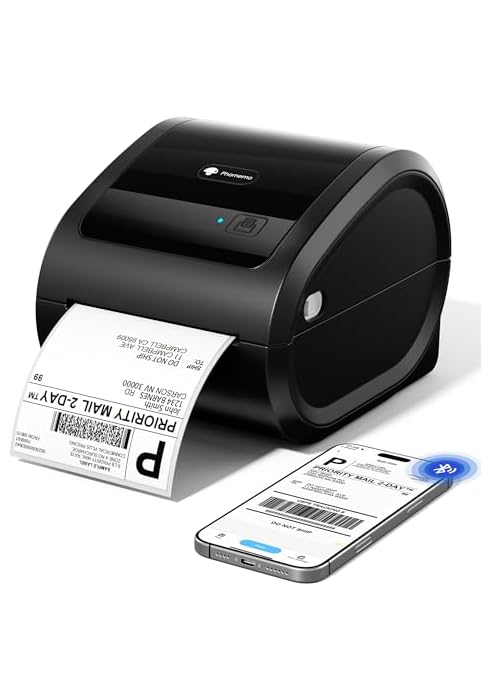
248Pro Label Printer 
[Smart Touchscreen Control for Easy Shipping] The PM64D 4×6 shipping label printer features a touchscreen for checking printer status and adjusting settings. Check printer status, adjust settings, and manage printing tasks directly from the device. Its compact design saves valuable desk space, making it ideal for small businesses, online sellers, and home offices.
[Wireless Bluetooth & USB Connectivity] Connect easily with Bluetooth 5.0 for iOS and Android devices, or use USB connection with Windows and macOS computers. The PM64D Bluetooth label printer provides flexible setup options for home offices, shipping stations, and small business workflows.
[Versatile Label Printing for Multiple Applications] Print more than shipping labels with support for label widths from 0.79″ to 4.53″. The PM64D thermal label printer supports 4×6 shipping labels, barcode labels, inventory tags, product labels, and organization labels for online sellers, retail, and home projects. Compatible with 1″ inner diameter rolls when used with the included bracket.
[Fast Inkless Thermal Printing with Sharp Labels] Create sharp and professional labels with 203DPI resolution and printing speeds up to 150mm/s. Direct thermal technology eliminates the need for ink or toner, while one-click label calibration helps with label setup before printing.
[Compatible with Popular Shipping & Selling Platforms] Built for online sellers and small businesses, the PM64D 4×6 label printer supports popular platforms including Amazon, Shopify, Etsy, eBay, PayPal, USPS, UPS, and FedEx. Create shipping labels, manage inventory, and organize daily tasks with ease.