
Related Products

roborock Qrevo CurvX Robot Vacuum...
Yaufey 2025 Most Efficient Energy...

8L Smart Humidifiers for Bedroom...

DREO 6L Humidifiers for Bedroom,...

Yaufey 80 Pints Energy Star Dehumidifier...




Product description
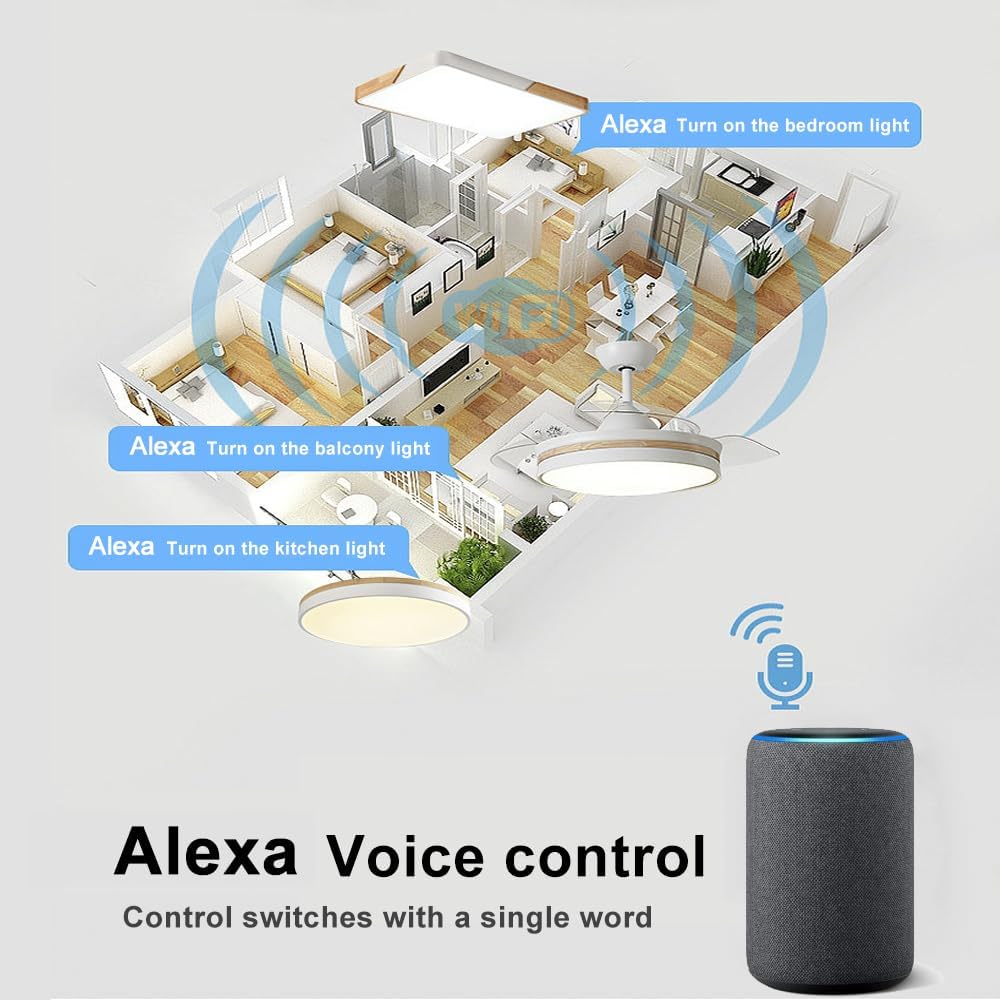
How do I connect to Alexa?
The following is an example using Amazon Echo
1. Complete product networking configuration in the Smart Life App
Complete the device’s networking configuration according to the prompts in the App
Note: In the App, change the name of the device to an easily identifiable name such as Alexa; names are usually in English, such as “bedroom light”,”bedroom fan”
2. Configure the Amazon Echo device
(If you have already configured Amazon Echo, you can skip this step. The following instructions are based on the iOS client)
1. Make sure your Amazon Echo device is powered on and connected to a Wi-Fi network.
2. Open the Alexa app on your phone. After successful login, tap on the menu in the upper left corner of the Home page, select “Settings” and tap “Set Up A New Device” to set up the Amazon Echo.
3. Choose your Amazon Echo device type and language for connecting. Press and hold the small dot on the device until the light turns yellow. Then tap “Continue” to connect to the hotspot.
After connecting to the Amazon Echo hotspot, return to the page. At this point, the connection is successful. Tap “Continue” to proceed to the next step. Choose a Wi-Fi network to connect to. Amazon Echo will take a few minutes to try to connect to the network.
4. After the network connection is successful, Tap “Continue.” An introduction video will appear. After the video ends, Tap “Continue” to jump to the Alexa Home page. You have now completed the Amazon Echo’s configuration process.
3. Key step – link Skill
1. Tap on “Skills” in the Alexa app menu.
2. Then search for “Smart Life”. Tap “Enable” to enable the Skill.
3. Enter the Smart Life APP account and password, then tap “Link Now” to link your Smart Life account to enable the Skill. Now you can start your smart home journey.
Common commands
Control the device via voice commands Now you can control your smart device with Echo. You can control your device (such as your bedroom light) with the following commands:
Alexa, turn on/off bedroom light. (Turn on/off the light)
Alexa, set the bedroom fan to low/medium/high speed
Alexa ,set the bedroom fan speed to 1/2/3
How do I connect to Smart Life?

Mobile App Pairing Instructions:
Step 1: Initiate pairing status
After the controller is powered on for 10 seconds, press and hold “LIGHT” and” HI” at the same time until you hear three long beeps from the receiver.
Step 2: Finishing the pairing progress in Mobile App
a) Download and Open “Smart Life” Mobile App.
b) Press the + button in the top right corner of the mobile App.
c) under “Add Manually” select Home Appliances.
d) Select Fan.
e) Click “Confirm indicator rapidly blink” and type in your WiFi name & password then proceed to click “OK”
f) After the loading screen go back to homepage and you should be able to find your device there.

Product Specifications
Applications Light/Fan
Operating Voltage 110V
Max Load Power <300W / 10A
Standby Power consumption <0.5 W
Working temperature -20℃~80℃
Control Method RF 433Mhz Remote & Mobile App Control
Wiring Method Load & Neutral Wire


Turn Your Light NO/OFF with Schedule Timers
Fan Speed/ Light on and off/ Timing Remote Control
Fan: 3 fan speed (high/medium/low) and off button (fan stop). Light control: on/off. No attenuation Timing: 1H, 2H, 4H, 8H

RF Remote Control Pairing Instructions:
(1)Within 3 seconds of powering up the controller, press and hold LIGHT and HI simultaneously until you hear three short beeps from the receiver.
Pairing process is completed.
(2)RF Remote Control Clearing/Reset Instructions:
Within 3 seconds after the controller is powered on, press the remote control that has already passed the code STOP and 2H to clear the code. When the buzzer rings for a long time, it will indicate that the ID of the remote control that has been stored in the internal memory of the controller has been completely erased.

Mobile APP Control, Buzzer on/off Setting
You can control your fan light through the “Smart Life” APP, and you can turn on/ off the buzzer through the APP.
QUESTION ABOUT US
Q: It’s too noisy, how do I set it to silent mode?
A: You need to set the silent mode in the “Smart Life APP”.
First, you need to turn on the fan in the APP, and then you can see the function of setting the mute in the APP;
if the fan is turned off, the function of setting the mute will not be displayed in the APP.
Q: Device not be found in smart life?
A: You can try to follow these steps:
1) Turn off the power of the receiver and wait for 1 minute.
2) Power on the receiver
3) Open the “Smart Life” APP
4) Under “Manual Add”, select “Small Home Appliances”.
5) Select “Fan”.
6) Click “Confirmation indicator flashes quickly”, enter your Wi-Fi name and password, and then click “OK”
(It should be noted that the choice of Wi-Fi network can only be 2.4G network)
7) After loading the screen and returning to the homepage, you should be able to find your device in it.
If the setup is unsuccessful, repeat the above steps.
Note:
When connecting devices via the app, please use 2.4GHz Wi-Fi rather than 5GHz Wi-Fi.Fan reverse operation is not supported.Dimming functionality is not supported.DC fans are not supported.
Wiring Notice (Important)
For ceiling fan lights with two separate Neutral (N) wires (one for light, one for fan), please connect both N wires together to our output COM terminal.
Add to Cart
Add to Cart
Add to Cart
Add to Cart
Add to Cart
Customer Reviews
4.3 out of 5 stars 2,867
4.1 out of 5 stars 862
4.5 out of 5 stars 403
3.3 out of 5 stars 42
3.5 out of 5 stars 79
3.8 out of 5 stars 63
Price
$13.99$13.99 $25.99$25.99 $11.99$11.99 $14.99$14.99 $15.99$15.99
— no data
Transmission
RF WiFi + RF RF Bluetooth + RF WiFi + RF Zigbee + RF
Remote Control
✓
✓
✓
✓
✓
✓
APP Control
no data
✓
no data
✓
✓
✓
Voice Control
no data
✓
no data
no data
✓
✓
LED CEILING FAN: Simply replace the original driver of your non-smart LED ceiling fan with FLC-110V driver, you’ll get a smart LED ceiling fan. It designed for ceiling fans and lights for three-speed motors and can be Used with ceiling fans for almost all well-known brands
– 3 Control Methods: RF Remote, Smart Life APP and Voice Control. Works perfectly with Alexa & Google Assistant, allowing hands-free operation and remote control of your ceiling fan and light from anywhere, anytime.
Remote Shortcuts: 3 fan speeds (High/Medium/Low), 4 timers (1H/2H/4H/8H); separate fan/light control .
– Real-Time APP Sync: Supports iOS & Android, with real-time device status synced to Smart Life APP. ⚠️ Important Notes: 1. Only works with 2.4G WiFi (not 5G/5.8G). 2. Receiver Size: 4.53×2.13×1.1 inches; usually installed inside the ceiling fan (junction box area), or on the fan’s top (where it connects to the ceiling) if it doesn’t fit. Measure in advance. 3. Not compatible with 3-motor-wire/DC ceiling fans; no reverse rotation or dimming.
Quiet & Disturbance-Free: No beeping sound from the receiver every time you operate the remote, avoiding disturbing your family’s rest. Note: To enable silent mode, first turn on the fan to make it rotate, then enter the device page in the Smart Life APP, click Settings and turn off the “Voice” switch.
$25.99