
Related Products

52” Wood Smart Flush Mount Ceiling...


DREO 6L Humidifiers for Bedroom,...

iRobot Roomba 104 2in1 Vacuum &...


Product description

Convert Traditional Ceiling Fans to Smart Ceiling Fans
You can control your ceiling fan & light with remote / smart life app / voice (Alexa or Google Assistant) .

Fan Speed/ Light on and off/ Timing Remote Control
Fan: 3 fan speed (high/medium/low) and off button (fan stop).
Light control: on/off.
No attenuation Timing: 1H, 2H, 4H, 8H

Mobile APP Control, Buzzer on/off Setting
You can control your fan light through the “Smart Life” APP, and you can turn on/ off the buzzer through the APP.

ALEXA/GOOGLE Voice Control
In the App,change the name of the device to an easily identifiable name such as
bedroom light,bedroom fan.
Common commands
“Alexa,tum on/off bedroom light.”
“Alexa,turn on/off bedroom fan.”
“Alexa,set the bedroom fan speed to two.”
“Alexa,turn up the bedroom fan speed.”
“Alexa,decrease the bedroom fan speed.”
HOW CAN I CONNECT “SMART LIFE” APP(Add Manually)

Step 1: Connect your phone to the 2.4G WIFI network (must be 2.4G).
Step 2: Open your “Smart life” APP, and add your device.
Step 3: Click “Smart Home Appliance” then click the “fan”.


Step 5: Choose Confirm indicator rapidly blink, then click “Next”.
Step 6: Waiting for connection.
Step 7: Connection succeeded.
In addition to manually adding devices, you can also turn on Bluetooth on your phone and use the “Auto Scan” feature in the “Smart Life” app to automatically search for and add devices.
Q: It’s too noisy, how do I set it to silent mode?
A: You need to set the silent mode in the “Smart Life APP”.
First, you need to turn on the fan in the APP, and then you can see the function of setting the mute in the APP;
if the fan is turned off, the function of setting the mute will not be displayed in the APP.
Q: Fan Running at Abnormal Speed?
A:If your fan has a pull chain or wall switch, make sure the speed is set to the highest level and the light switch is turned on.
Once these steps are completed, you will be able to use the remote to adjust fan speed and control the light normally.
Q: Smart Life can’t detect the device?
A: Please complete the following steps in order.
1、 Set the receiver to pairing mode.
Ensure the receiver has been powered on for at least 1 minute.
Press and hold the LIGHT and HI buttons on the remote simultaneously until you hear three consecutive long beeps.
Tip: The three long beeps confirm the receiver is in pairing mode.
2、Configure your network and device.
Connect your phone to a 2.4 GHz Wi‑Fi network.
Enable your phone’s Bluetooth.
Open the Smart Life app and use the “Auto Scan” function to search for and add the device automatically.
If the problem persists, please ensure the receiver is within range of your Wi‑Fi router and that your network is working properly.
Attention:
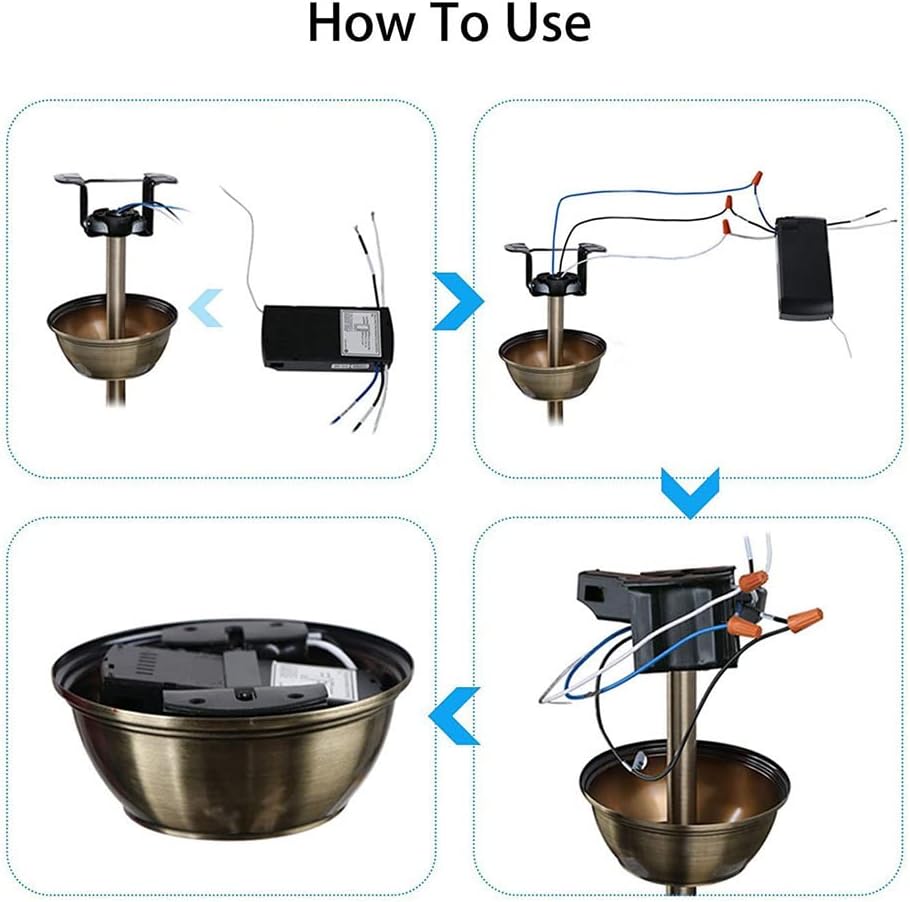
The size of this fan light remote receiver is 4.53″x2.13″x1.1 inches.please check the size of your fan light canopy before buying.Does not support dimming!only support light ON/OFF.Does not support DC motors! Does not support ceiling fans with 3-wire motors!Reversal is not supported!Battery:2 AAA battery needed( not include)
How do I connect to Alexa?
The following is an example using Amazon Echo
1. Complete product networking configuration in the Smart Life App
Complete the device’s networking configuration according to the prompts in the App
Note: In the App, change the name of the device to an easily identifiable name; names are usually in English, such as “bedroom light”,”bedroom fan”
2. Configure the Amazon Echo device
(If you have already configured Amazon Echo, you can skip this step. The following instructions are based on the iOS client)
1. Make sure your Amazon Echo device is powered on and connected to a Wi-Fi network.
2. Open the Alexa app on your phone. After successful login, tap on the menu in the upper left corner of the Home page, select “Settings” and tap “Set Up A New Device” to set up the Amazon Echo.
3. Choose your Amazon Echo device type and language for connecting. Press and hold the small dot on the device until the light turns yellow. Then tap “Continue” to connect to the hotspot.
After connecting to the Amazon Echo hotspot, return to the page. At this point, the connection is successful. Tap “Continue” to proceed to the next step. Choose a Wi-Fi network to connect to. Amazon Echo will take a few minutes to try to connect to the network.
4. After the network connection is successful, Tap “Continue.” An introduction video will appear. After the video ends, Tap “Continue” to jump to the Alexa Home page. You have now completed the Amazon Echo’s configuration process.
3. Key step – link Skill
1. Tap on “Skills” in the Alexa app menu.
2. Then search for “Smart Life”. Tap “Enable” to enable the Skill.
3. Enter the Smart Life APP account and password, then tap “Link Now” to link your Smart Life account to enable the Skill. Now you can start your smart home journey.
Common commands
Control the device via voice commands Now you can control your smart device with Echo. You can control your device with the following commands:
“ALEXA,TURN on the bedroom light!”
“Alexa,Set the bedroom fan to low/medium/high level”
“Alexa, Set the bedroom fan speed to 1/2/3”
Widely applicable: This Wi-Fi ceiling fan remote control kit is specifically works with almost 95% regular ceiling fans, such as Hampton Bay and Harbor Breeze fans.
Installation easily: All the wires are color coded and marked, so nothing confusing there.
Connected easily: they connected to smart life. They were immediately recognized by Alexa and respond to voice commands and smart home automations.
Function Timing : Schedule every of your devices to prevent wasted standby power and overcharging for speed and time
Notice: When you choose to connect to the router on the mobile App, please choose 2.4G network; do not choose 5G or 5.8G network. Otherwise the device may not be able to connect to the App.
Purchase Note: Our receiver size is 4.53 inches * 2.13 inches * 1.1 inches.
Does not support DC motors! Does not support ceiling fans with 3-wire motors!
$42.99