
Related Products


Product description
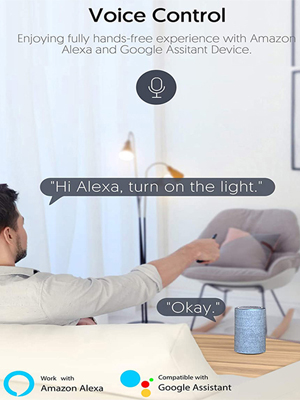
Voice control
 Smart Life APP Pairing Instruction
Download the “Smart Life” app from the App Store (for iOS) or Google Play (for Android).Turn off the power before installation.When the device is powered on for the first time, it will automatically enter pairing mode (the LED indicator will flash quickly).If it doesn’t, press and hold the pairing button for 3–7 seconds until the LED starts flashing rapidly.The app will automatically search for and connect to the device.Enter your home Wi-Fi SSID and passwordName the device to complete the setup
Works with Amazon Alexa & Google Home Assistant
Download and open the Amazon Alexa App (or Google Home App).Log in with your Smart Life account.After logging in, Alexa/Google Home will automatically discover all devices linked to your Smart Life account that support voice control.Rename devices if needed for easier voice commands.Now you can control your devices by voice, for example:
“Alexa, turn on the light.””Hey Google, turn off the bedroom light.”
Works with Alexa and Google Home voice control smart devices. Control your light or Access control by voice commands.
Wiring Instructions
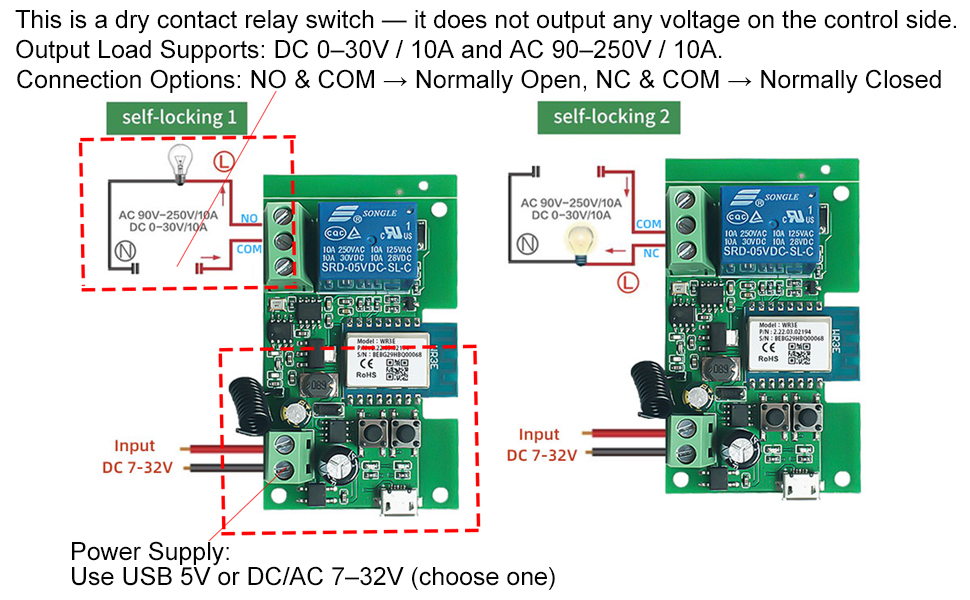
Power Supply:Use USB 5V or DC/AC 7–32V (choose one)Function:This is a dry contact relay switch — it does not output any voltage on the control side.You can connect the output (control circuit) to either: DC 0–30V, up to 10A, or AC 90–250V, up to 10A.The relay can be wired as: NO & COM for normally open operation, or NC & COM for normally closed operation.
Quick to Access 2 Working Modes
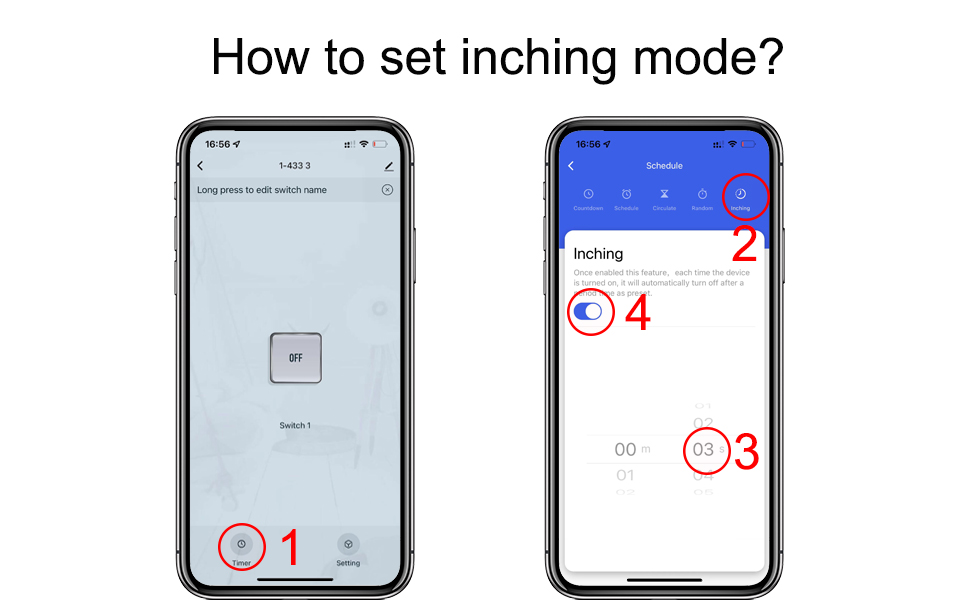
Self-lock mode: Works like a regular switch — press once to turn ON and stay on, press again to turn OFF.Inching mode: Turns ON when activated, then automatically turns OFF after the set time (1–3600 seconds)
The device works in self-locking mode by default.
How to set inching(jog) time 1-3600s?
To set the jog/inching time:
Open the device control page in the Smart Life app.Go to Timer → Inching.Select the desired time (from 1 to 3600 seconds). Time unit: seconds (1s).Tap Save to confirm.
How to Connect with Access control?
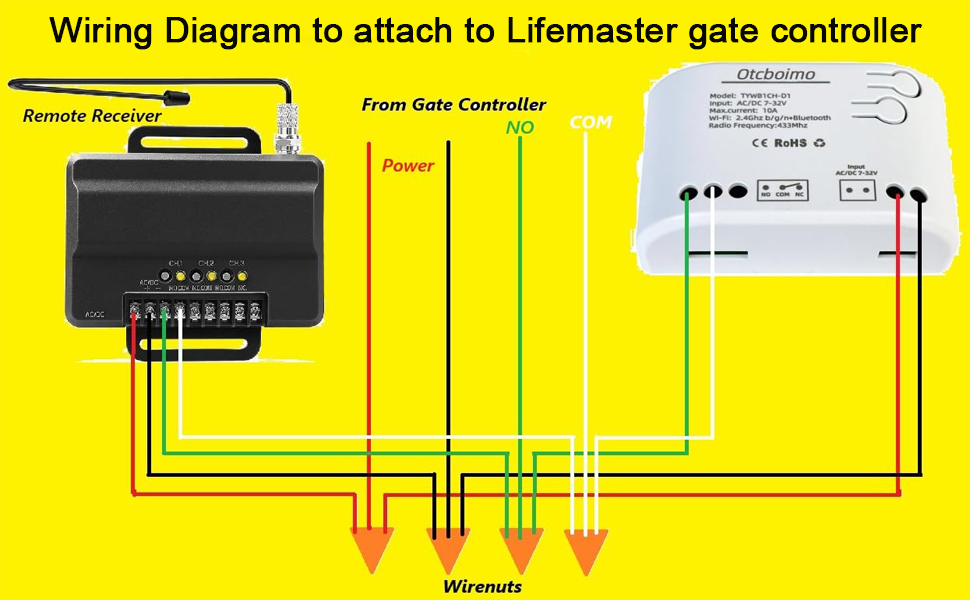
Wiring Description (Access Control / Inching Mode)
Power Input (7–32V): Connect the positive (+) and negative (–) wires from the power supply to the input terminals on the module. → This part provides working power for the relay module itself.Output Terminals (NO & COM): The NO (Normally Open) and COM (Common) terminals act as a dry contact output, just like a traditional push button. → Connect these two terminals to the two ends of the access control push switch (or any other device input that needs a momentary signal).Operation: When the relay is triggered in inching mode, NO and COM will short-circuit briefly (according to your set jog time), simulating a button press to activate the access control system.
Q: Why did my device fail to pair?
A:
The device may not be in pairing mode.Your Wi-Fi name or password may contain special characters (such as @, #, &, *).MAC address filtering might be enabled on your router.
Test Tip:Use two phones — one to create a Wi-Fi hotspot and the other to pair the device.If pairing succeeds, the issue is likely with your router settings.
Q: Does the device support 5GHz Wi-Fi?
A:No, it only supports 2.4GHz Wi-Fi. If your router uses dual-band (2.4G + 5G) combined, please go to your router settings, separate the two networks, and set different passwords for each.
Add to Cart
Add to Cart
Add to Cart
Add to Cart
Add to Cart
Add to Cart
Customer Reviews
5.0 out of 5 stars 1
4.3 out of 5 stars 142
4.3 out of 5 stars 142
4.3 out of 5 stars 142
4.3 out of 5 stars 142
4.3 out of 5 stars 142
Price
$16.99$16.99 $12.99$12.99 $17.99$17.99 $16.99$16.99 $20.99$20.99 $20.99$20.99
Input
AC/DC7-32V or USB 5V AC85-250V or USB 5V AC/DC7-32V or USB 5V AC85-250V or USB 5V AC/DC7-32V or USB 5V AC85-250V or USB 5V
Channel
with remotes 1 2 2 4 4
Output
Dry contact Dry contact Dry contact Dry contact Dry contact Dry contact
Inching mode
✓
✓
✓
✓
✓
✓
Self-lock mode
✓
✓
✓
✓
✓
✓
Interlock mode
No NO
✓
✓
✓
✓
Wi-Fi & Bluetooth-operated smart relay switch with 1 channel, up to 10A. The device is equipped with potential-free outputs (dry contacts), providing high flexibility in voltage support and various applications. It can be used to control a wide range of home appliances, electrical circuits, and office equipment individually.
APP remote control:Make any electrical appliance,Door Access Control System, Electric Outdoor Gate, Sliding Gate Opener, Garage Door Opener and irrigation system smart , With 2 working modes: self-locking and inching mode.You can now automate and control remotely every electrical appliance – even the old fan, room heater, pool system, –with just a click. You can use the Tuya/Smart Life app on Android and iOS to remotely control the on/off of electronic devices from anywhere.
Voice control:This WiFi switch can be used with Alexa/Google Assistant, and you can use voice control to turn on/off home appliances.
Timing function: set the timer and countdown, you can set timer schedules to automatically turn on/off your device according to your daily habits.
Easy to use smart switch: 2.4G WiFi and Bluetooth protocol. When adding a device, the device is automatically identified, which is very simple and convenient. The WiFi relay only supports 2.4G WiFi and not the mesh WiFi system and 5G WiFi network. When pairing, make sure it is close to the router.
$11.99