
Related Products

Aqara Thread/Zigbee Smart Climate...


vine Smart Thermostat for House,...



Product description


Convert Traditional Ceiling Fans to Smart Ceiling Fans

Fan Speed/ Light on and off/ Timing Remote Control
Fan: 3 fan speed (high/medium/low) and off button (fan stop). Light control: on/off.
No attenuation Timing: 1H, 2H, 4H, 8H

Mobile APP Control, Buzzer on/off Setting
You can control your fan light through the “Smart Life” APP, and you can turn on/ off the buzzer through the APP.

WIFI Voice Control
You can use Amazon Alexa, Google Assistant to voice control your fan lights.
“ALEXA,TURN on the bedroom light!”
“ALEXA,TURN on the bedroom fan”
“ALEXA,SET the bedroom fan speed to 1/2/3”
“ALEXA,SET the bedroom fan to high/medium/low speed”
HOW CAN I CONNECT “SMART LIFE” APP

Step 1: Connect your phone to the 2.4G WIFI network (must be 2.4G).
Step 2: Open your “Smart life” APP, and add your device.
Step 3: Click “Smart Home Appliance” then click the “fan”.


Step 5: Choose Confirm indicator rapidly blink, then click “Next”.
Step 6: Waiting for connection.
Step 7: Connection succeeded.
How do I connect to Alexa?
The following is an example using Amazon Echo
1. Complete product networking configuration in the Smart Life App
Complete the device’s networking configuration according to the prompts in the App
Note: In the App, change the name of the device to an easily identifiable name such as Alexa; names are usually in English, such as “bedroom light”
2. Configure the Amazon Echo device
(If you have already configured Amazon Echo, you can skip this step. The following instructions are based on the iOS client)
1. Make sure your Amazon Echo device is powered on and connected to a Wi-Fi network.
2. Open the Alexa app on your phone. After successful login, tap on the menu in the upper left corner of the Home page, select “Settings” and tap “Set Up A New Device” to set up the Amazon Echo.
3. Choose your Amazon Echo device type and language for connecting. Press and hold the small dot on the device until the light turns yellow. Then tap “Continue” to connect to the hotspot.
After connecting to the Amazon Echo hotspot, return to the page. At this point, the connection is successful. Tap “Continue” to proceed to the next step. Choose a Wi-Fi network to connect to. Amazon Echo will take a few minutes to try to connect to the network.
4. After the network connection is successful, Tap “Continue.” An introduction video will appear. After the video ends, Tap “Continue” to jump to the Alexa Home page. You have now completed the Amazon Echo’s configuration process.
3. Key step – link Skill
1. Tap on “Skills” in the Alexa app menu.
2. Then search for “Smart Life”. Tap “Enable” to enable the Skill.
3. Enter the Smart Life APP account and password, then tap “Link Now” to link your Smart Life account to enable the Skill. Now you can start your smart home journey.
Common commands
Control the device via voice commands Now you can control your smart device with Echo. You can control your device (such as your bedroom light) with the following commands:
“ALEXA,TURN on the bedroom light!”
“ALEXA,SET the bedroom fan speed to 1/2/3”
QUESTION ABOUT US
Q: It’s too noisy, how do I set it to silent mode?
A: You need to set the silent mode in the “Smart Life APP”.
First, you need to turn on the fan in the APP, and then you can see the function of setting the mute in the APP;
if the fan is turned off, the function of setting the mute will not be displayed in the APP.
Q: Device not be found in smart life?
A: You can try to follow these steps:
1) Turn off the power of the receiver and wait for 1 minute.
2) Power on the receiver
3) Open the “Smart Life” APP
4) Under “Manual Add”, select “Small Home Appliances”.
5) Select “Fan”.
6) Click “Confirmation indicator flashes quickly”, enter your Wi-Fi name and password, and then click “OK”
(It should be noted that the choice of Wi-Fi network can only be 2.4G network)
7) After loading the screen and returning to the homepage, you should be able to find your device in it.
If the setup is unsuccessful, repeat the above steps.
Packing Includes:
1 * Remote Control
1 * Receiver (1 * Remote control stand)
Attention:
Light control: on/off. Not dimmable!Battery:2 AAA battery needed( not include)This set is not compatible with some special fans that can only be used with the original remote control kit.Check the size of the receiver carefully to make sure there is enough space on the fan to install it. The size of our receiver is 4.53″x2.13″x1.1″.Not suitable for DC ceiling fan motors
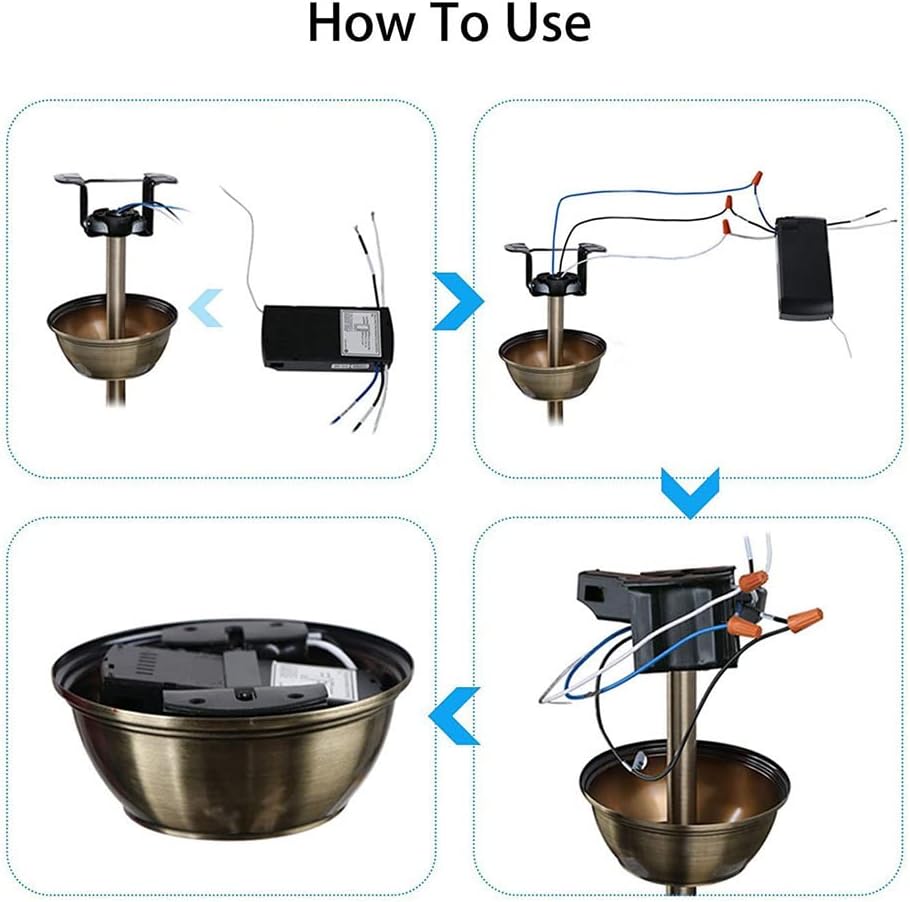
【Universal & Handheld Remote Control】Simply replace the traditional driver of your non-smart LED ceiling fan with this driver, you’ll get a intelligent remote control LED ceiling fan light. The handheld remote control can conveniently control the ceiling fan light without stepping. This set is designed for ceiling fans and lights for three-speed motors and can be used with almost all well-known brands of ceiling fans. ❤ The remote control kit includes a transmitter and a receiver.
【Control Fan and Light on/off & 3 Fan Speeds】 Designed with separate buttons, including multiple functions, can control fan and light on/off separately; Control the 3 fan speed, including 1/2/3 / level.
【Timing Off Function & Mute Function】It has 4 timing settings (1/2/4/8), which means Power off after (1H/2H/4H/8H). When used with a smart home device, you can set the appointment/countdown to turn on/off at the specified time; You can use the “Smart Life” APP to implement the mute function. For specific operations, refer to the operation steps on the product description page below.
【WIFI Voice Control & APP Support】Compatible for Amazon Alexa, Google Assistant, IFTTT, can voice control ceiling fan light; APP Support:Ceiling fan Remote control and receiver for iOS and Android mobile apps. Sync Status – Real-time device status provided to the app, Download and Open “Smart Life” Mobile App. ❤NOTE: when you choose the router connected to the mobile app, please select the 2.4G network. Don’t choose 5G or 5.8G network. Otherwise, the device may not be able to connect to the APP.
【Signal Stabilization & Guarantee】433mHz stable signal, 50-60hz stable frequency, no interference through the wall, throw away the traditional wall switch, easy to control; Ultimate warranty and customer support: Enjoy 12 months warranty for hardware related issues combined with friendly 24/7 email support. Note: If you have any problems when using this product, please feel free to contact us. This is most likely a problem with the operation, not a product quality problem.
Purchase Note: Our receiver size is 4.56 inches * 2.13 inches * 1.1 inches. Not suitable for DC ceiling fan motors
$24.99