
Related Products


MOFII Wireless Keyboard and Mouse...

XPPen Upgraded Artist13.3 Pro V2...


Product description
 Small Frame, Big Screen
Features a Full-screen design, compared with other displays, VK1200 V2 drawing tablet with screen is almost no frame. See every detail of your work clearly on the 1920×1080 full-laminated IPS display.
 Natural Drawing Experience
Battery-free stylus, 8192 pressure levels, 60° tilt function, and 290PPS report rate provide excellent precision and reduced parallax.
 Metal Body and Anti-Slip
The back of the drawing display features an anti-slip design which provides a stable drawing experience.
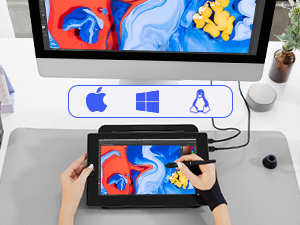 Easy to Connect to Your Device
It is compatible with Windows 7 (or later), Mac OS X 10.12 (or later) and Linux.
 Multi-Software Support
Compatible with most software, such as Adobe Creative Software, Sai, Corel Painter, MediBang Paint, Clip Studio, Krita, Zbrush, Zoom, and more.
 Easy to Setup
The VK1200 V2 drawing display connects easily to your device via a new update USB-C cable or a HDMI &USB cable on different devices. It helps to make your workspace clean and tidy.
 Full-Laminated Technology
VK1200 V2 drawing monitor chooses full laminated screen which combining the glass and screen seamlessly. This ensures the accuracy of the cursor position and the lowest parallax.
 Leap your ideas off the screen
The 11.6-inch display features 16.7 million pixels, 120 sRGB/72% NTSC of true-to-life color, and ultralow reflectivity, making text sharp and colors vivid, wherever you are.
 Portable and Compact
The sleek and lightweight design allows you to put it in your bag or carry on the go.
 Designed for the Creative Workflow
Comes with 6 customizable shortcut keys, enabling you to do so much, so quickly.
 More Accessories
Get more value with the package that includes not one, but 2 pens, 28 extra pen nibs, an artist glove, a pen holder, a clean cloth, and a nib remover.
Draw, Write and Learn with VK1200 V2 Intuitively
Every workspace is different, depending on who you are, what you do and how you create. Veikk provides almost the same high performance with precision, accuracy, seamless integration with creative software applications and built-in comfort for the long hours of creating and learning. VK1200 V2 graphic tablet with screen is the best choice to satisfy the demanding needs of the creators.
The video showcases the product in use.The video guides you through product setup.The video compares multiple products.The video shows the product being unpacked. aplus content video
Important Notice:
Important Note:
System Compatibility: This drawing monitor is NOT a standalone device – it must be connected to a laptop or desktop computer to function. Compatible with Windows 7+, macOS 10.12+, and Linux (specific versions). Not compatible with iPhones or iPads.
Connection Options: Two ways to connect
(A) Full-Featured USB-C–C: Use the included Type-C to Type-C cable for simultaneous data, power, and video transmission.
(B) HDMI + USB: If your PC lacks Full-Featured USB-C, connect via HDMI (plug into graphics card, not motherboard for desktop users) plus the black USB-A to C cable. If the screen flickers due to low power, plug the red USB-A cable into another PC USB port or a phone power adapter (adapter not included).
Driver Installation: Download the latest VEIKK driver from VEIKK official website. Important: Install after connecting the display to your PC. Ensure no other tablet drivers are present to avoid conflicts, and close all antivirus and drawing software before installation.
macOS Mojave/Catalina Users: After installing the driver on macOS 10.14 or 10.15, you must add “Tablet Driver Center” to the system whitelist. For step-by-step guidance, visit VEIKK web and search “How to install driver in Mojave/Catalina” in the FAQ section.
 Start Your Drawing Journey
Instead of drawing on paper or graphic tablet, using a VK1200 V2 drawing tablet to help you start your art creation intuitively, easier, and environmently. Come join us to build a digital art world!
 Edit Photos Precisely
With the pressure settings on the pen, paired with the freedom of movement using a stylus instead of a mouse, allow for much more precise changes while working on fine details like dodging, burning…
 Make Design Quicker and More Fun
You have no need to lift up and move when you want or go to a differnet part of the computer screen with a pen display, which giving you the natural flow of your hand motions.
 Build Your Own Role
It can utilize the display’s pressure sensitivity to make tasks such as digital sculpting and texturing easier on Zbrush, Blender or Maya.
 Learn or Work from Home
Whether your job or study requires a lot of annotations or video conference presentations, VK1200 V2 will make it easier to interact with and engage your students, teachers, or colleagues.
How to connect VK1200 V2 to the computer?
Connect VK1200 V2 drawing tablet with screen to your device via a new update USB-C cable or a HDMI&USB cable. If the screen is flashing , please connect the red colored USB-A cable to another USB interface on the computer or power adaptor.
What should I do if I have any problem during using this display?
If you have any problems with VEIKK drawing tablets, please go to our official web for online help. Anyway, Customer’s satisfaction is most important thing for us.
Full-Laminated Technology & Anti-Glare Glass:The VEIKK VK1200 V2 drawing tablet features advanced full-laminated technology, seamlessly integrating the glass and screen to minimize parallax and ensure cursor accuracy. Its 11.6-inch active area is protected by anti-glare glass, providing scratch resistance and a natural paper-like drawing experience. The IPS display offers 1920×1080 resolution with 72% NTSC color gamut
Tilt Function & 8192-Level Pressure-Sensitive Battery-Free Pen:This drawing monitor includes two battery-free pens with8192 levels of pressure sensitivity and 60-degree tilt recognition. The pens require no charging or batteries, ensuring uninterrupted creativity
Easy Setup:The VK1200 V2 drawing tablet with screen supports single-cable connectivity via a full-featured USB-C cable (transmitting data, power, and DP signals simultaneously). For devices without USB-C, use the included HDMI and black USB-A to C cables. Compatible with Windows 7+, macOS 10.12+, and Linux
Customizable Shortcut Keys: Six programmable shortcut keys can be customized according to your drawing habits in different software, which can improve efficiency and create a highly ergonomic and convenient work platform
Compact & Stylish Design: VK1200 V2 pen display features a full-screen design with an almost frameless all-screen infinity display. With the same active area of 11.6 inches, the VK1200 V2 is more compact, stylish, and easy to carry on the go. The VK1200 V2 graphic display has an all-metal body, and the back adopts an anti-slip design ensures stability during use
Premium Accessories:VK1200 V2 drawing display includes 2 pens in the package for a longer using experience, also includes 28 replacement nibs, a pen holder, an artist glove and a cleaning cloth. Supported by a 1-year hardware and lifetime driver upgrades. NOTE: VEIKK VK1200 V2 drawing tablet must be connected to a computer to work