
Related Products


Smart Door Access Control System...


TEEHO TE003 Keyless Entry Keypad...



Product description


1 Multiple Unlocking Method
2 Smart APP Unlock
3 Fingerprint Unlock
4 RFID Card Unlock
5 IP68 Waterproof


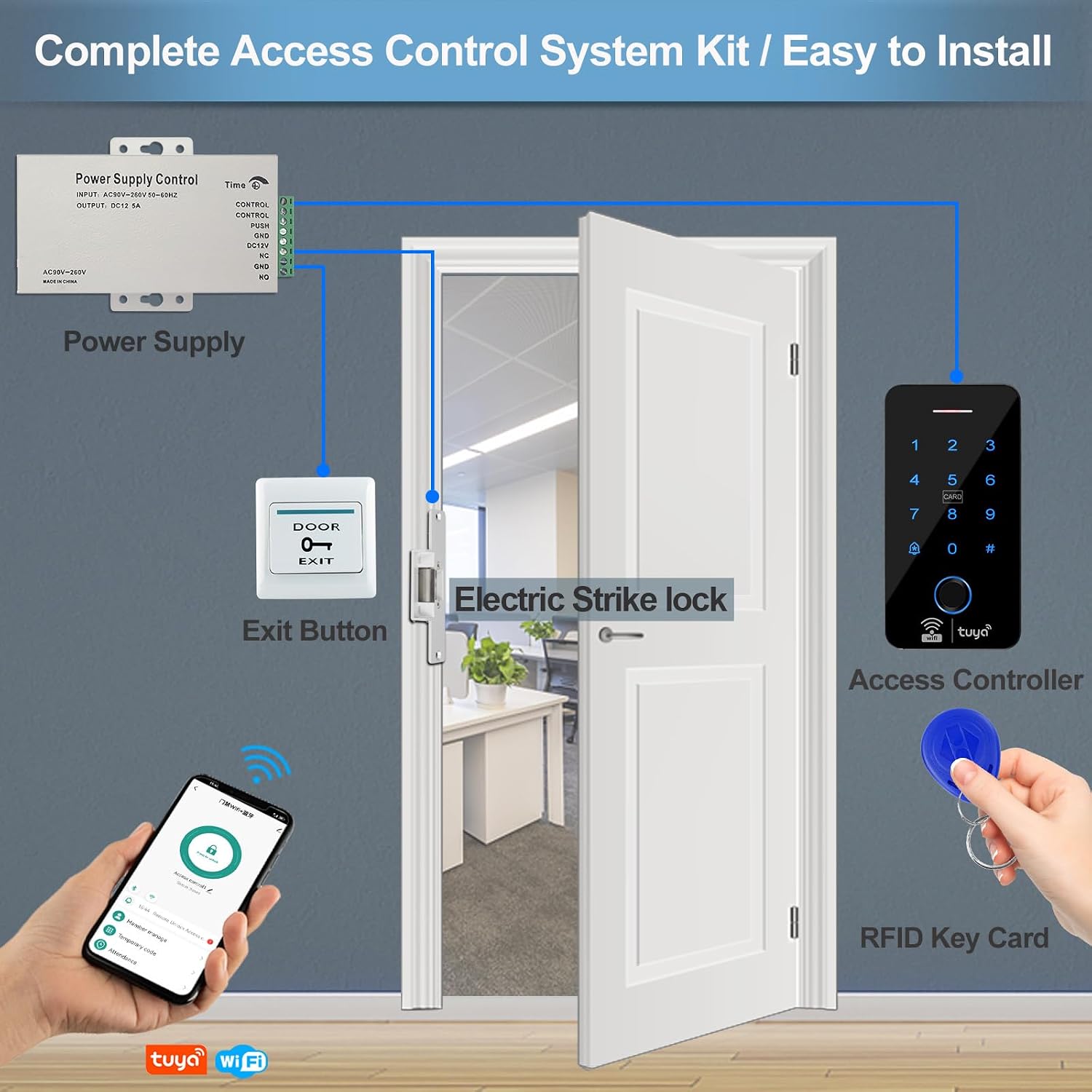
1 Electric Strike Lock
2 Access Power Supply
3 Suitable for Door Type
4 Easy installation
5 Package Includes
WiFi Tuya Smart APP Remote Control and Management 
WiFi Tuya Smart APP support for Remote Unlocking, User Management, and Access Records Viewing at anytime anywhere. It’s very convenient! No need to connect to a computer, No monthly fees

Wiring Diagram
Easy Wiring
1) Connect 4 Cables of Access Controller to Power Supply: 12V (red cable) to +12V; GND (black cable) to GND ; NO/PUSH (yellow cable) to PUSH ; COM (grey cable) to GND
2) Connect the cables of Electric lock to NC, GND of the Power supply.
3) Connect the cables of Door Exit Button to PUSH, GND of the Power supply.
4) Connect the cables of Access controller, Door exit button, Electric lock to the DC12V Ppower supply.
5) Connect the cables of the DC12V power supply to your AC Power.

The video showcases the product in use.The video guides you through product setup.The video compares multiple products.The video shows the product being unpacked. How to add Tuya APP
How to Add Tuya Smart APP?
Instructions for the Tuya APP
1) Search “Tuya Smart” in App store to download it.
2) Turn on Tuya APP, mobile phone Wifi and bluetooth
3) Enter # * 123456 # 68 # on the access control keypad, Click “Add Device’
4) Enter the WiFi password, Click “Next”
5) Click “Done’
✅【Waterproof Design】IP68-rated waterproof construction, can be used indoors and outdoors. Made of high quality plastic, touch screen panel. Has backlight, work indicating light, very convenient to use even at dark
✅【Dual Frequency】Supports 100 fingerprints and 8000 RFID card large user capacity. Working with 125KHz and 13.56MHz dual frequency, compatible with both RFID EM ID and IC cards. Can set Management cards, easy to program!
✅【Wifi Tuya Smart App Remote Control】WiFi Tuya Smart APP support for remote unlocking, user management, and access records viewing at anytime anywhere. It’s very convenient! No need to connect to a computer, No monthly fees
✅【5 Multiple Ways to Unlock】Offers multiple verification modes including Smartphone Tuya application, Fingerprint, RFID card, Password, and RFID card plus password combinations. Simple to use, no longer worry about forgetting mechanical keys when you go out, make your life safer and more convenient!
✅ 【Easy Installation】A complete set includes Fingerprint access control keypad + Power supply + Door exit button + RFID keyfobs +NC type (fail safe type) Electric Strike lock. Very suitable for wooden door, metal door, fireproof door etc. We provide instructions, describing step-by-step setup and connection, and after-sales support
$69.99