
Related Products


Redragon M810 Pro Wireless Gaming...

RaceGT USB C Wireless Mouse, Type...

AceGamer Aurora II 2.4G Wireless...




Product description
Versatile Wireless Mouse for All Your Devices 
Experience seamless connectivity and superior performance

Enjoy adjustable DPI, silent clicks, and long battery life for ultimate convenience
 Noiseless Click Silent Wireless Mouse
FYBC quiet mouse reduces clicking and scrolling noise by 90%, so you won’t hear any clicking or scrolling noise whether you’re in the office, library or at home
Compact and lightweight design for easy portability 
Enjoy adjustable DPI, silent clicks, and long battery life for ultimate convenience
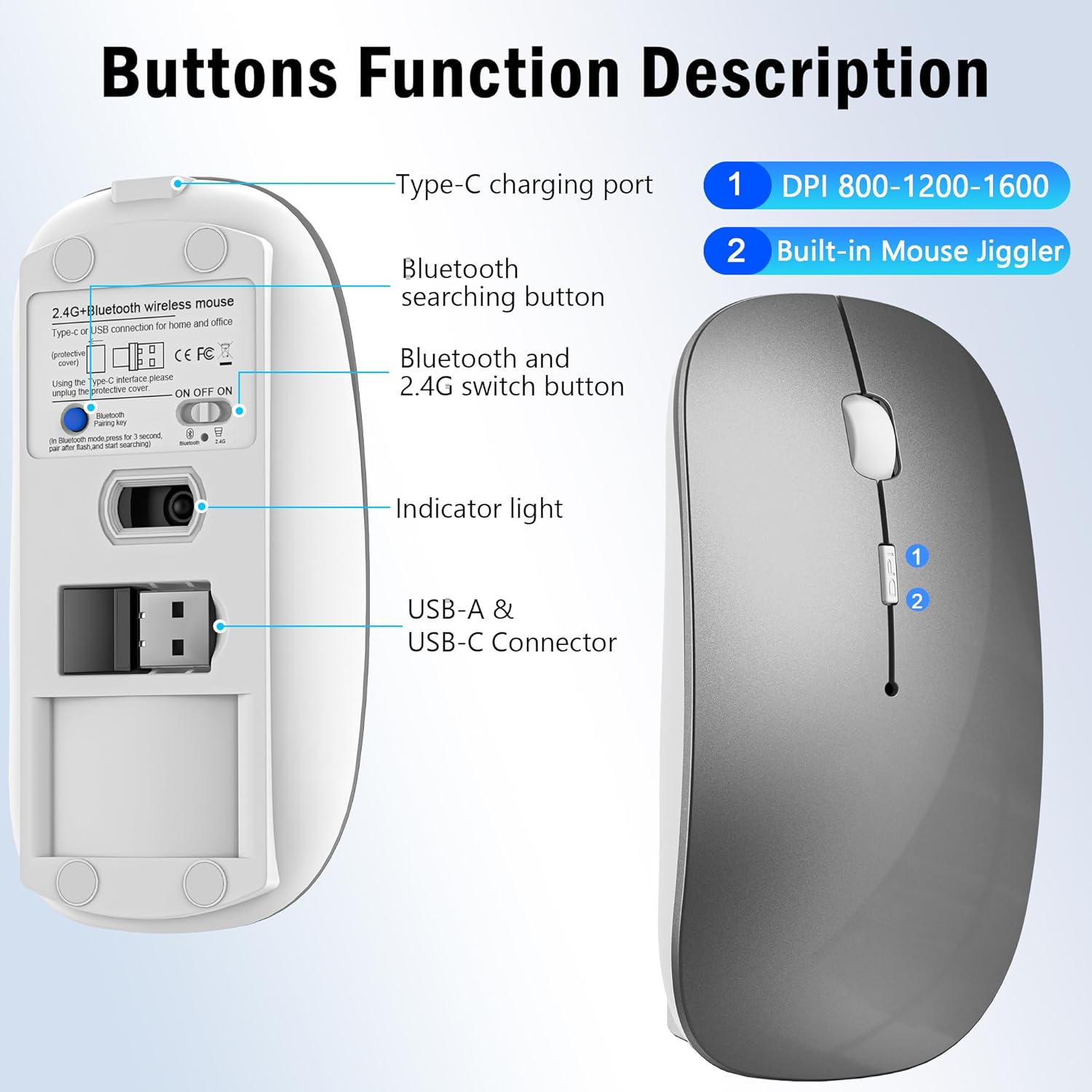
FYBC Upgraded cordless mouse combines mouse and jiggler in one 
Prevent computer from locking while you’re away, ensuring maximum productivity without interruptions
What devices does this mouse support? Does it require drivers?
Dual receivers (USB-A/Type-C) plug-and-play for MacBooks, iPads, Windows PCs, Android tablets—no drivers needed.
Does it work with my Macbook Pro?
Yes, it works with iOS, Mac OS, iPad OS, Windows, Linux, Android, etc. (Requires a Bluetooth-enabled Mac OS 10.11 or later, iOS/ iPadOS 13 or later)
How does the mouse connect to your MacBook Air/Pro iPad, etc. via Bluetooth pairing?
1. On your MacBook, choose Apple menu > System Settings (or System Preferences) > Bluetooth.
2. When your BT5.2/3.0mouse appears in the device list, click Connect. Once connected, the LED will stop blinking and the mouse is ready to use wirelessly.
How to use the Jiggler mode?
Please press the DPI button for 3-5 seconds to turn on/off the Jiggler mode.
FYBC Wireless Mouse Bluetooth 5.2/3.0 & USB-A/Type-C Receiver with Jiggler Mode
Add to Cart
Add to Cart
Add to Cart
Add to Cart
Add to Cart
Customer Reviews
4.4 out of 5 stars 228
4.4 out of 5 stars 228
4.4 out of 5 stars 228
4.4 out of 5 stars 228
4.4 out of 5 stars 228
Price
$19.99$19.99
$19.99$19.99
$19.99$19.99
$19.99$19.99
$19.99$19.99
Connection
USB A/ Type C & Bluetooth
USB A/ Type C & Bluetooth
USB A/ Type C & Bluetooth
USB A/ Type C & Bluetooth
USB A/ Type C & Bluetooth
DPI Level
800 – 1200 – 1600
800 – 1200 – 1600
800 – 1200 – 1600
800 – 1200 – 1600
800 – 1200 – 1600
Mouse Jiggler
✔
✔
✔
✔
✔
Type-C Fast Charging
✔
✔
✔
✔
✔
Silent
✔
✔
✔
✔
✔
【 Ultimate Versatility for All Devices 】Experience seamless compatibility with all your devices! FYBC wireless Bluetooth mouse Jiggler offers Bluetooth connectivity for MacBook Pro, MacBook Air, iPad Pro, iPad Air, and more. Plus, the innovative dual-port 2-in-1 receiver (2.4GHz USB-A and USB-C) guarantees FYBC portable macbook wireless mouse can provide stable and reliable connections for all your devices — no hassle, just performance
【 2-in-1 Wireless Mouse & Undetectable Mouse Jiggler 】FYBC 2025 upgraded wireless Bluetooth mouse for macbook pro combines a cordless mouse and jiggler, two essential functions in one device! No need for an extra mouse mover jiggler — simply press and hold the DPI button for 3-5 seconds to activate the undetectable jiggler mode to keep your computer from locking when you have to step away is perfect for office workers, remote workers, IT professionals, and more
【 Precision with Adjustable DPI & Optical Tracking 】Take control with precision! FYBC wireless mouse for Macbook Air features a high-performance optical sensor with 3 adjustable DPI levels (800, 1200, 1600 DPI) that cycle with just a quick press. Whether you’re designing or browsing, enjoy smooth tracking on any surface. Ideal for professionals who require accuracy, this is the best magic mouse alternative for daily tasks
【 Type-C Fast Charging & Long Battery Life 】Enjoy the convenience of a wireless rechargeable mouse that lasts up to 90 days on a single charge! Say goodbye to disposable batteries – FYBC’s USB-C fast charging means you can fully recharge the mouse in just 1.5-2 hours. It’s the ideal solution for anyone seeking a reliable and eco-friendly USB C wireless mouse
【 Quiet, Comfortable, and Ultra-Portable 】Work in peace with 90% less click noise! FYBC wireless mouse for iPad Pro travel is designed for comfort with a slim, ergonomic shape that fits comfortably in small to medium-sized hands. Weighing just 68 grams, it’s lightweight and easy to carry anywhere—whether you’re at home, in the office, or on the go. Perfect for iPads, laptops, and more, it’s the wireless silent mouse solution you’ve been looking for
$19.99