
Related Products


Logitech G502 Hero High Performance...




Product description

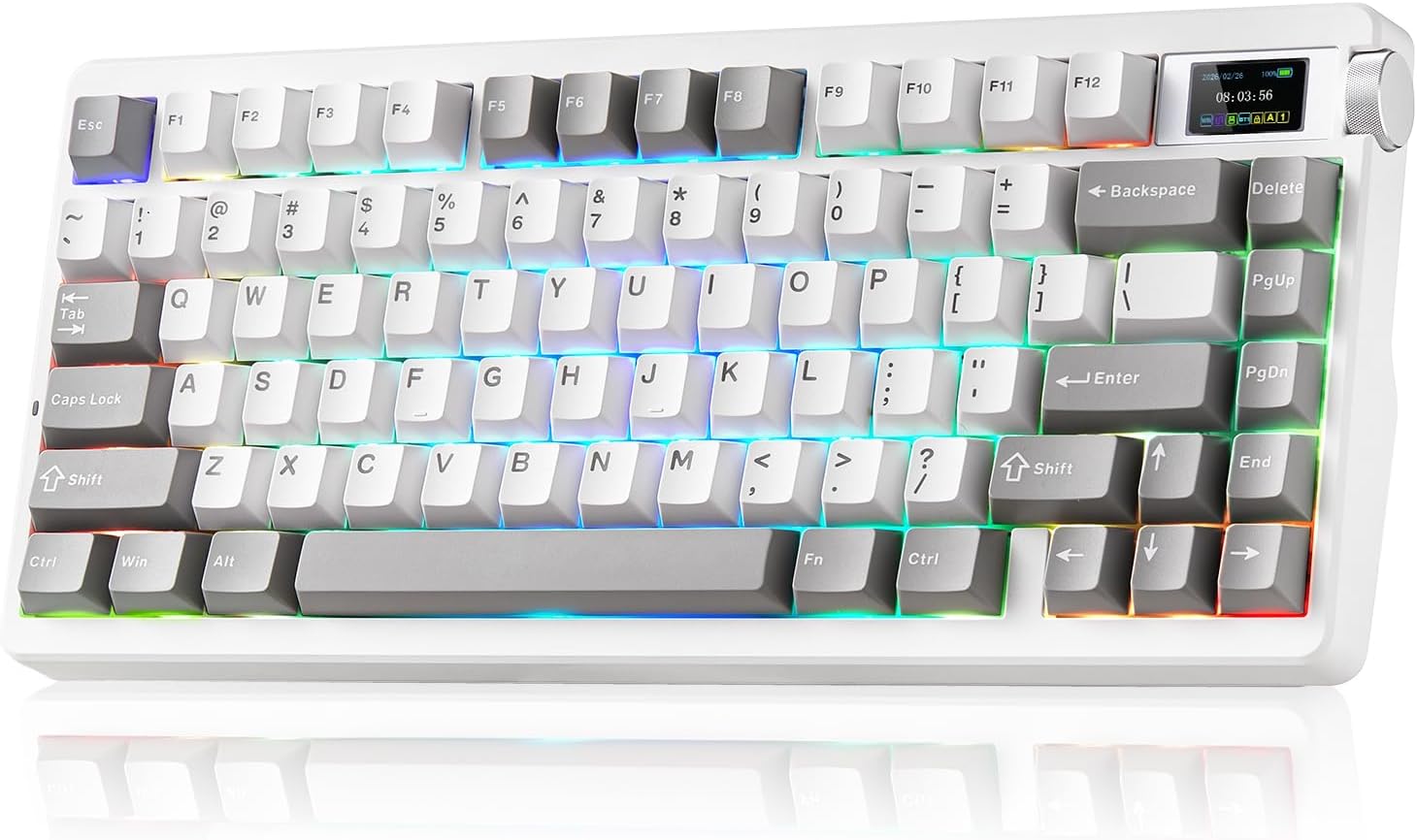
The video showcases the product in use.The video guides you through product setup.The video compares multiple products.The video shows the product being unpacked. LEOBOG x AULA Nova75 Gaming Keyboard Introduce
Switches Parameter Comparison
Add to Cart
Add to Cart
Add to Cart
Add to Cart
Add to Cart
Customer Reviews
5.0 out of 5 stars 2
5.0 out of 5 stars 2
—
4.8 out of 5 stars 15
4.8 out of 5 stars 15
4.8 out of 5 stars 145
Price
$79.99$79.99
$79.99$79.99
—
$64.99$64.99
$65.99$65.99
$62.69$62.69
Switches Name
Seiya Switches
Caramel Latte Switches
Phantom Cherry Switches
Strawberry Mint Switches
Matcha Latte Switches
Reaper Switches
Total Travel
3.5±0.3mm
3.6±0.2mm
3.6±0.4mm
3.7±0.3mm
3.6±0.2mm
3.6±0.3mm
Actuation Force
40±3gf
42±3gf
42±3gf
29±3gf
42±3gf
45±3gf
Initial Force
32gf
45±8gf
35±10gf
24±10gf
35±10gf
36gf
Bottom-Out Force
55±3gf
55±10gf
55±10gf
38±3gf
55±8gf
55±3gf
Actuation Travel
1.8±0.3mm
1.6±0.4mm
1.6±0.4mm
1.8±0.3mm
1.8±0.3mm
1.8±0.3mm
Main Purpose
Gaming
Office
Gaming
Gaming
Office
Gaming
Compatible Applications
Office
Gaming
Office
Office
Gaming
Office
Battery Capacity
8000mAh
8000mAh
8000mAh
8000mAh
8000mAh
4000mAh
Positioning Board Material
FR4 Positioning Board
FR4 Positioning Board
FR4 Positioning Board
FR4 Positioning Board
FR4 Positioning Board
Single key slotted PC board


1 Keyboard Highlights
2 Tri-modes
3 Multi-Functional Button
Three Modes Connection 
 8000mAH
The large battery capacity increases the battery life in wireless mode. Please note that don’t use a fast charging cable to charge this keyboard.
 PBT Keycaps
Double shot PBT keycaps, made from many colors material molded into each others, make the keycaps characters maintain the vibrance and saturation.
 Side Function Keys
Support BT 3.0/5.0, 2.4GHZ wireless and USB-C wired connection. Users can quickly switch between connection modes using the mode switch on the side.
 Ergonomic Kickstand
It adjustable Keyboard Stand has 2 adjustable height levels and can make users adjust the keyboard tilt according to their own requirements.
How do I connect the keyboard?
Toggle the side button to 2.4G/BT/Wired mode, then:
2.4G mode: press FN+’~ key for 3s, then plug in the receiver.
BT mode: press FN+1/2/3, search for the device named AULA-F75 3.0KB/AULA-F75 5.0 KB on your pc/tablet/phone, select it to connect.
How do I customize the keyboard?
Download the AULA Nova75 driver software on the website , switch the keyboard’s side button to wired mode, then open the software to customize settings via the interface.
Is the keyboard compatible with Mac OS?
Yes, the keyboard is compatible with Mac OS, Windows and Laptop After connectivity, press FN+E = Mac system (the light of E key red flashes for 3s).
Note: driver software only supports Window system in wired mode.
How can I put the keyboard into sleep mode when not in use?
The keyboard will automatically enter sleep mode after 1 minute(you can reset the time via the Driver) of inactivity. To wake it up, simply press any key.
【Three-Mode Connection Gaming Keyboard】: The AULA Nova75 mechanical gaming keyboard supports Bluetooth 5.0, 2.4GHz, and USB-C wired connections. It can connect to up to five devices simultaneously and switch between them easily via the Fn + keys combination or the side button. The Nova75 computer keyboard is suitable for desktops, laptops, tablets, smartphones, PlayStation, and more, meeting all your connection needs. Additionally, this rechargeable keyboard is equipped with an 8000mAh high-capacity battery for long-lasting use.
【75% Compact Design, Core Functionality】: The Nova75 professional gaming keyboard features 80 programmable keys, a customizable display, and sleek side lighting, striking the perfect balance between reliability and innovative features. Experience effortless control with the volume knob, enjoy the visual feast of dynamic icons, and customize your experience with 20 backlight modes. This gaming keyboard integrates connection management, battery monitoring, and status indicators, while its TFT smart display makes it an indispensable assistant and productivity booster for both gaming and daily life.
【Ultra-Responsive Low-Latency & 16.8M RGB Illumination Customization】: This Gaming keyboard features 20 RGB lighting effects with adjustable brightness and flow rate. The meticulously designed Black&White&Grey Tri-color injection-molded PBT keycaps add a touch of fashion and romance to your desktop. With Aula’s dedicated software, you can easily create keyboard shortcuts, macros, and customize RGB LED colors. It’s time to fully enjoy the fun of creating a personalized keyboard.
【Premium Hot-Swappable Custom Keyboard】: Nova 75 keyboards feature pre-lubricated linear switches paired with south-facing transparent light diffusers, delivering a comfortable typing experience and an impressive, authentic typing sound right out of the box. This Gasket-mounted keyboard’s hot-swappable PCB is compatible with 3-pin or 5-pin switches.
【Colorful multimedia Display TFT】: The keyboards with TFT screen DIY multimedia display design located in the upper right corner of the keyboard allows you to intuitively display custom GIF images, language selection, volume adjustment, connection mode, WIN/MAC/iOS/Android, backlight brightness/speed, RGB mode effects/colors, and more. The 11°tilt angle of the display will be more in line with visual habits.
【Premium Service for One Year】 Encounter quality issues within one year? We’ll replace it with a brand-new unit at no cost. Every quality enhancement permeates our entire process—from R&D and production to marketing and sales. We’ll respond within 24 hours, ensuring you’ll never want to put down our keyboard.
(Note: For setting custom screen images/GIFs or adjusting the date/time, simply download the official AULA software for Windows and connect your keyboard using the USB cable. The software is completely safe and will not affect your computer.)
$79.99