
Related Products

UGREEN NAS DXP4800 Plus 4-Bay Desktop...
Samsung T7 Portable SSD, 1TB External...

8GB Flash Drive 10 Pack Bulk USB...


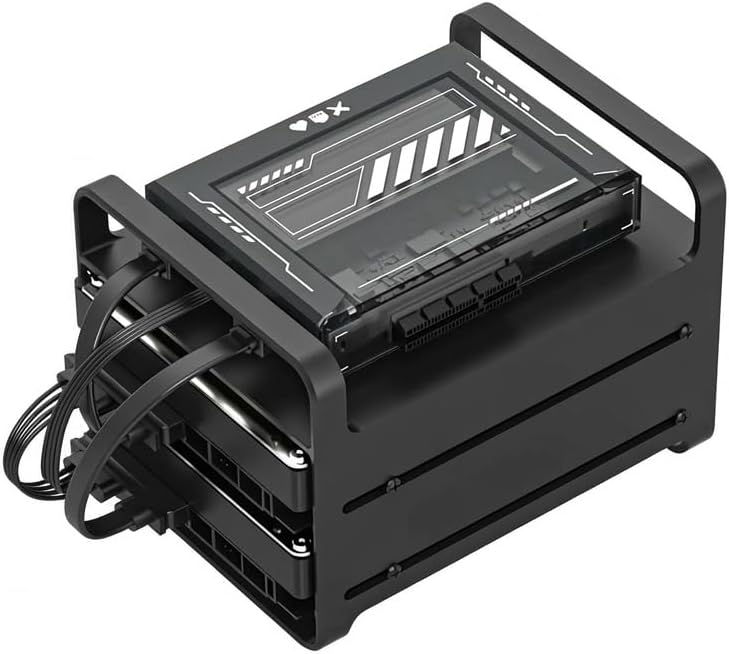


Product description

ZimaBlade Reclaim Your Cloud
 Personal Cloud Storage
Empower your data management with ZimaBlade X86 Personal NAS Cloud Storage – your personal cloud solution for effortless file storage and sharing.
 Wireless Travel Router
Transform your Zimablade into a powerful wireless router by adding a compatible wireless network card and installing routing software like OpenWRT or pfSense.
 Auto GPT Server
ZimaBlade offers cutting-edge AI language capabilities with GPT technology, providing seamless integration for automated content generation.
 Light Homelab Server
Unlock the full potential of your homelab with ZimaBlade X86 Lightweight Homelab Server Node – your ideal solution for scalability and efficiency.
 Cyber Security Firewal
Experience the next level of digital security with ZimaBlade X86 Cybersecurity Firewall – your shield against cyber threats.
Product Structure Diagram 
Connect, Expand, Hack
 Retro gaming
Enjoy ZimaBlade’s ultimate retro gaming experience and relive the best of 20th century games. ZimaBlade brings endless hours of nostalgic fun right to your fingertips!
 Self-Hosted AI
Get Auto-GPT running with a single click! Automate news tracking, easily control your smart home, or train a digital assistant. With ZimaBlade, you can enjoy these features while keeping full control.
 Media Streaming
From your favorite movies to hi-res music, ZimaBlade can stream everything you need, wherever you are. Because it’s your server, there are no subscriptions or fees.
 Trusted File Storage
With ZimaBlade’s dual SATA 3 ports and PCIe slots, you can create a personal NAS with up to 154 TB of storage to backup and access your most important files over either Wi-Fi or Ethernet.
Features & Specifications
Compatible OS Linux / Windows / OpenWrt / pfSense / Android / LibreELEC Processor Intel -E3950 Graphics HD Graphics 500 Memory 1x SODIIMM Slot Compatible with 16GB DDR3L Onboard Storage eMMC 5.1 32GB TDP 6W HDD / SSD 2x SATA 6.0 Gb/s Ports LAN 1x GbE LAN Ports USB 1x USB 3.0 PCIe 1x PCIe 2.0 x4 Display 1x Mini-DisplayPort 1.2 4K@60Hz Power USB-C PD 3.0 (12V/3A) Cooling Passive Virtualization Intel VT-d, VT-x Decoding H.264(AVC), H.265(HEVC), MPEG-2, VC-1
I’d like to build a rackmount cluster of ZimaBlades. Is this technically possible?
Through community interactions, we’ve identified clustering as a popular application scenario. Utilizing software like PVE and Ansible, you can swiftly set up a compact desktop-level cluster.
Does the ZimaBlade system meet the minimum requirements for TrueNAS, and has it been tested with TrueNAS?
Yes, we’ve previously conducted basic compatibility testing and verification for TrueNAS.
Can I connect a 3.5″ HDD to each of the two SATA ports on the ZimaBlade using a SATA Y cable without issues?
Yes, the SATA Y cable is fully compatible with connecting two 3.5″ HDDs to the ZimaBlade, a setup that has been confirmed for its engineering integrity and reliability over time.
Does ZimaBlade support Wake on LAN?
ZimaBlade features Wake on LAN (WoL), enabling remote power-on and wake-up from sleep or off states for convenient network access. This feature can be enabled or disabled through BIOS settings.
How to ssh ZimaBlade’s default OS?
To SSH into CasaOS:
1. Get IP: Check your router to find the CasaOS device IP. 2. SSH Command: Type ssh casaos@IP_ADDRESS in your terminal. 3. Credentials: Use “casaos” for both username and password. Quick and secure, you’re now connected to CasaOS.
【Break the 1GB/4GB RAM Barrier】ZimaBlade supports up to 16GB swappable RAM. Effortlessly run Plex, 50+ Docker apps, and Home Assistant simultaneously without a single stutter
【True Desktop-Class x86 CPU】 Don’t let restricted smartphone-grade ARM chips limit your potential. ZimaBlade’s Intel Quad-Core x86 architecture ensures 100% native compatibility with professional software and Docker images. It’s a real computer power, not just a storage box
【The Only NAS with PCIe Expansion】 Traditional 2-bay NAS units are dead-end hardware. ZimaBlade features an external PCIe 2.0 x4 slot, giving you the freedom to upgrade to 10GbE networking or add NVMe SSD caches
【CasaOS: Setup in 3 Minutes】 Say goodbye to complex NAS setups. Pre-installed CasaOS provides an ultra-intuitive, smartphone-like UI for photo syncing, file sharing, and one-click app installs. Perfect for beginners, built for enthusiasts
【Open System Freedom】 Your data, your choice. Unlike proprietary closed-systems, ZimaBlade fully supports Unraid, TrueNAS, and Proxmox. Enjoy a high-speed private cloud with zero subscription fees and complete privacy from manufacturer tracking
$249.90